Adaptive Path Selection: Real Numbers from 4 Networks
The problem we solved
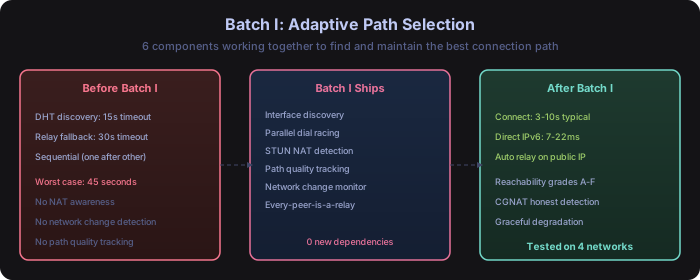
Before Batch I, connecting to a peer was a serial process: try one method, wait for it to fail, try the next. Worst case: 45 seconds to connect. And once connected, you had no idea whether you were using the best available path or limping through a relay unnecessarily.
Batch I teaches Shurli to race all connection methods in parallel, measure the results, and always use the fastest path. It also honestly tells you when your network makes a direct connection impossible, instead of silently failing.
What this means for you
The short version: Connecting to your peers went from 45 seconds worst-case to 3-10 seconds typical. And Shurli now tells you WHY your connection is the way it is. “You’re behind carrier NAT, so you’ll go through a relay” is more useful than “connecting…” for 45 seconds.
If you’re on your home WiFi with your peer on the same network: you get a direct LAN connection at 2-22ms. If you’re on a different network with public IPv6: direct connection at 7-29ms. If you’re tethered to your phone with carrier NAT: relay connection at 112-200ms, because that’s the physics of the situation.
The numbers
Two cross-network test sessions. Four network types. Real measurements, not benchmarks.
| Network | Path | Latency | Notes |
|---|---|---|---|
| Satellite WiFi | DIRECT | 22ms avg | IPv6 QUIC, same LAN |
| Terrestrial WiFi | DIRECT | 7-29ms | Cross-ISP via public IPv6 |
| 5G Cellular (CGNAT) | RELAYED | 112-200ms | Carrier NAT blocks direct |
| 5G Day 2 (hole-punch) | DIRECT | 68-160ms | DCUtR succeeded, 257ms punch |
| Wired Ethernet | FAILED | - | Daemon died on interface change |
Connection time dropped from 45 seconds worst-case to 3-10 seconds typical. Zero packet loss through a live WiFi-to-cellular network switch. One honest failure that we haven’t fixed yet.
What we tested
Four network types, two machines, one relay:
- Network A (Satellite WiFi): Consumer satellite internet with stock router. Both peers on the same LAN. Full IPv6 with ULA addresses.
- Network B (Terrestrial WiFi): Standard ISP with enterprise access points. Different ISP from Network A. Public IPv6 available.
- Network C (5G Cellular CGNAT): Mobile hotspot through carrier NAT. Private
172.x.x.xaddresses. No inbound connections possible without hole-punching. - Network D (Wired Ethernet): USB-to-LAN adapter. Always-priority route. Used as baseline and for testing interface changes.
Methodology: the USB LAN adapter was unplugged before each WiFi switch to force all traffic through the network being tested. No split routing, no cheating.
Latency across networks
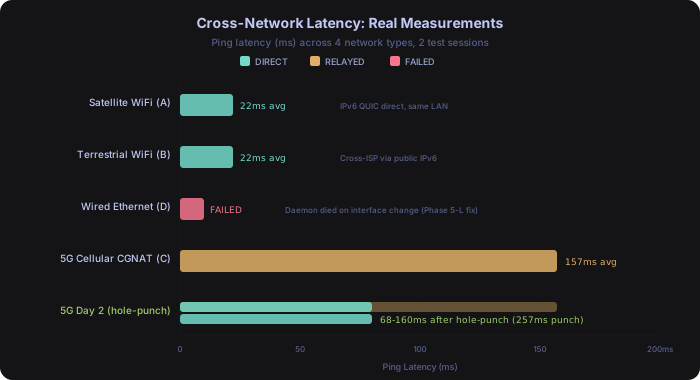
The chart tells the story. Satellite and terrestrial WiFi both achieve direct connections at 22ms or less via IPv6. The 5G cellular path has no choice but to relay at 157ms average because carrier NAT blocks direct connections.
The interesting result is day 2 on 5G: a hole-punch succeeded via DCUtR (Direct Connection Upgrade through Relay), dropping latency from 157ms relayed to 68ms direct. The carrier’s NAT port mapping from the relay connection was still fresh. On subsequent attempts after switching away and back, the mapping had expired and all three hole-punch attempts failed. CGNAT is intermittently punchable, not reliably so.
Parallel dial racing
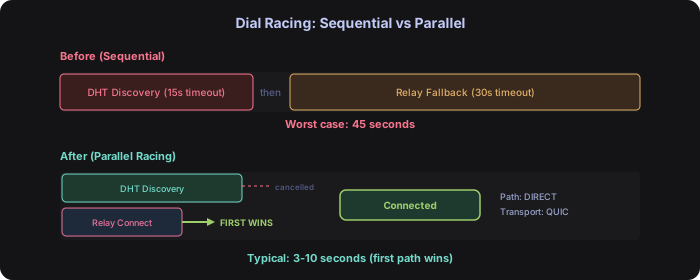
Before Batch I, connection setup was sequential: try DHT discovery (15 second timeout), then fall back to relay (30 second timeout). Worst case: 45 seconds to connect.
Now both paths race in parallel. DHT discovery and relay connection start simultaneously. The first path to succeed wins. The loser gets cancelled. Typical connection time: 3-10 seconds.
The implementation uses Go’s context cancellation. When the relay connects first (common on CGNAT networks), the DHT goroutine’s context gets cancelled immediately. No wasted resources, no zombie connections.
After the initial connection, path upgrades happen in the background. A relayed connection can be upgraded to direct if hole-punching succeeds, without dropping the existing session.
Reachability grades: what your network means for you
STUN (Session Traversal Utilities for NAT) determines what kind of NAT sits between a peer and the internet. Most implementations pull in external libraries. Ours is ~150 lines of Go with zero new dependencies.
It uses Google’s public STUN servers to determine the external IP and NAT behavior, then classifies the result into a reachability grade. Here’s what each grade means in plain terms:
| Grade | What it means | What you experience |
|---|---|---|
| A | You have a public IPv6 address | Direct connections always work. Best possible latency. |
| B | Public IPv4 or a simple NAT | Direct connections usually work. Occasional relay. |
| C | Restricted NAT (port filtering) | Direct connections need extra effort. May relay. |
| D | Symmetric NAT or CGNAT | Direct connections are unlikely. Expect relay. |
| F | No connectivity detected | Something is wrong. Check your network. |
Why this matters: Most P2P tools will tell you “connected” or “not connected.” Shurli tells you WHY. If you’re Grade D, you know to expect relay latency. If you’re Grade A, you know direct connections should always work. If they don’t, something else is wrong.
The CGNAT detection that others get wrong
The critical design choice: CGNAT detection caps the grade at D regardless of what the inner NAT reports. STUN will happily say “hole-punchable” when a port-restricted NAT sits behind CGNAT, because STUN only sees the inner NAT. The outer CGNAT will still drop unsolicited inbound packets. Our grade computation overrides STUN’s false optimism.
Auto-detection identifies RFC 6598 addresses (100.64.0.0/10) on local interfaces. Mobile carriers that use RFC 1918 addresses (like 172.x.x.x) for CGNAT cannot be auto-detected, but users can set network.force_cgnat: true in their config to correctly signal their CGNAT status.
Graceful network switching
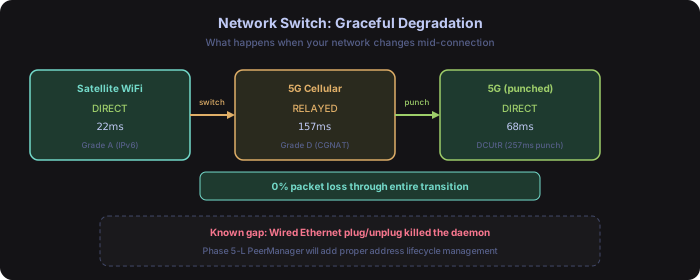
During testing, we switched from Satellite WiFi (direct, 22ms) to 5G Cellular (relayed, 157ms) while a connection was active. Zero packet loss through the entire transition.
The network change monitor detects interface changes and triggers three things:
- Stale address detection - old addresses get flagged with
[stale?]labels within 10 seconds - STUN re-probe - determines reachability on the new network
- Path re-evaluation - if the current path is dead, falls back to relay immediately
The known gap: plugging or unplugging a wired Ethernet adapter killed the daemon. Fixed in Phase 5: PeerManager’s CloseStaleConnections() handles interface addition/removal gracefully. See Phase 5: Automatic WiFi Transition.
Every peer is a relay
Most P2P systems have dedicated relay infrastructure. Centralized VPN services run vendor-operated relay servers. P2P libraries provide their own relay nodes. These require someone to operate and pay for servers.
In Shurli, every peer with a public IP automatically becomes a relay for peers that need one. If your home server has a public IPv6 address (increasingly common with IPv6 adoption at ~49% globally), it serves as a relay for your mobile devices behind CGNAT. No configuration. No extra software. No monthly server bill.
The relay capability activates when the daemon detects a public IP during startup. It uses libp2p’s circuit relay v2 protocol with resource limits: bounded connections, bounded bandwidth, TTL on reservations. A compromised relay can’t amplify traffic or hold connections indefinitely.
This matters because relay dependence is temporary. As IPv6 adoption continues (projected 80% by 2030-2032), more peers will have direct-capable addresses and fewer will need relaying at all.
The surprise: CGNAT hole-punch
Day 2 testing on the 5G cellular network produced an unexpected result. The first ping went through the relay at 157ms. The second ping came back direct at 68ms. DCUtR (Direct Connection Upgrade through Relay) had succeeded.
What happened: the relay connection created a NAT port mapping on the carrier’s CGNAT. DCUtR exploited that existing mapping to establish a direct connection, bypassing the relay entirely. The hole-punch took 257ms.
This isn’t reliable. On day 1, the same network stayed relayed for the entire session. After switching to Satellite WiFi and back, three subsequent hole-punch attempts all failed (the mapping had expired). The carrier’s NAT behavior is inconsistent.
But it demonstrates the system working exactly as designed: try everything, take whatever works, be honest about what doesn’t.
Observability: everything is measured
Every path decision, dial attempt, and network event is instrumented with Prometheus metrics. You don’t just know that Shurli picked a path: you can see the data behind the decision.
| What happens | What gets measured |
|---|---|
| Connection attempt | shurli_dial_attempts_total{path, result} - success/failure by path type |
| Dial timing | shurli_dial_duration_seconds{path} - how long each dial method takes |
| Connected peers | shurli_connected_peers{path, transport, ip_version} - current state |
| Hole-punch attempt | shurli_holepunch_total{result} - success or failure |
| Hole-punch timing | shurli_holepunch_duration_seconds - how long the punch took |
| Network change | shurli_interface_changes_total - interface add/remove events |
| NAT detection | shurli_stun_probes_total{grade} - STUN results by reachability grade |
All metrics feed into the pre-built Grafana dashboard (37 panels). Watch path selection decisions happen in real time, compare latency across paths, and understand your network’s NAT behavior over time. Enable with --metrics-addr. Zero overhead when disabled.
What was broken (update: mostly fixed)
Honesty about failures matters more than marketing about successes. Here’s what was broken at Batch I ship time, with Phase 5 status:
Wired Ethernet plug/unplug kills the daemon.Fixed in Phase 5.CloseStaleConnections()matches connection local IPs against removed interfaces and closes dead connections instantly. USB LAN plug/unplug tested and working.No path re-upgrade after network switch.Fixed in Phase 5. Three mechanisms: mDNS LAN discovery withForceDirectDial, IPv6 path probing viaProbeAndUpgradeRelayed(), and PeerManager relay-discard when direct exists. Tested on 7 transition scenarios.CGNAT detection misses RFC 1918 carriers.Fixed in Phase 5. Users can now setnetwork.force_cgnat: truein config to correctly signal CGNAT when their carrier uses RFC 1918 addresses. Auto-detection still handles RFC 6598 (100.64.0.0/10) automatically.SSH proxy always relayed.Partially fixed in Phase 5. Daemon-managed connections benefit from path upgrades (mDNS, IPv6 probing, relay-discard). Standaloneshurli proxysessions without daemon may still relay.
Impact
| Before Batch I | After Batch I | |
|---|---|---|
| Connection time (worst case) | 45 seconds | 3-10 seconds |
| Connection time (same LAN) | 15 seconds | 3 seconds |
| NAT awareness | None | A-F grade with CGNAT detection |
| Network change handling | None | Graceful degradation, 0% packet loss |
| Relay infrastructure | VPS only | Every peer with public IP |
| Observability | None | 10 Prometheus metrics, Grafana dashboard |
| New dependencies added | 0 | |
| Networks tested | 0 | 4 (satellite, terrestrial, 5G, wired) |
Six components shipped in Batch I: interface discovery, parallel dial racing, STUN NAT detection, path quality tracking, network change monitoring, and every-peer-is-a-relay. Zero new dependencies. Tested on real networks with real measurements, including the failures.
Update: Phase 5 shipped. mDNS native discovery, PeerManager lifecycle management, and automatic WiFi transition are all live. See Phase 5: Automatic WiFi Transition for the full results.