From Broken to Bulletproof: How Chaos Testing Transformed Shurli's Network Layer
The problem we solved
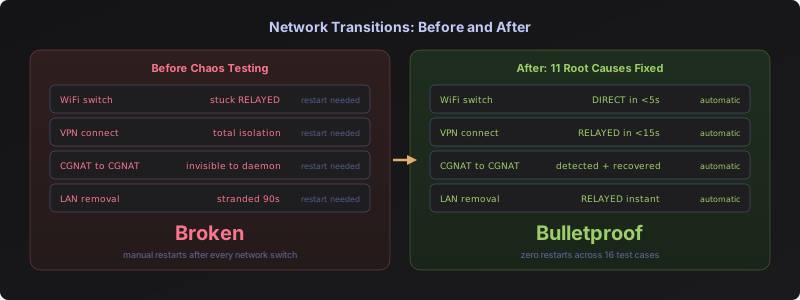
Before this work, switching networks could break Shurli. Move from your home WiFi to your phone’s hotspot? The daemon might stay stuck on a dead connection. Connect a VPN? Total isolation. Switch between two mobile hotspots? The daemon didn’t even notice. In each case, the only recovery was restarting the daemon.
This is the kind of problem you don’t find in unit tests. It only shows up when real hardware switches between real networks.
What this means for you
The short version: Switch networks freely. Shurli handles it.
You can walk from your home WiFi to a coffee shop, tether to your phone on the train, plug into a wired LAN at the office, connect a VPN for privacy, and Shurli stays connected through all of it. No restarts. No manual intervention. The daemon detects every change, cleans up, and reconnects automatically.
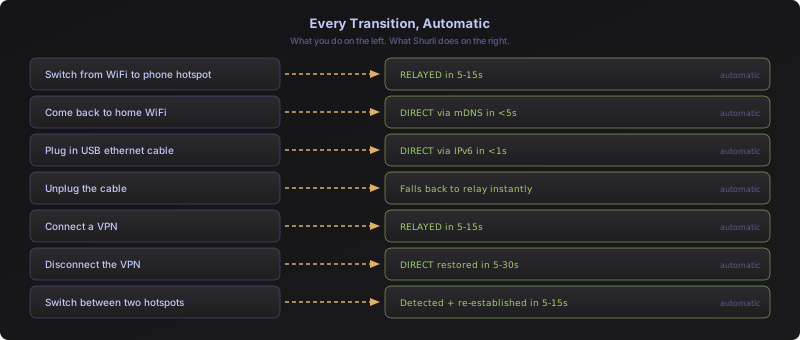
Every one of these required a daemon restart before. Now: zero restarts across 16 test cases.
The numbers
| Metric | Value |
|---|---|
| Networks tested | 5 ISPs + 3 VPN providers |
| Test cases | 16 distinct transitions |
| Root causes found | 11 (all fixed) |
| Post-chaos flags | 8 investigated (6 fixed, 2 informational) |
| Engineering time | 40+ hours across 4 days |
| Code commits | 14 |
| Daemon restarts needed after fixes | 0 |
How we got here
The testing method
No simulations. A MacBook switching between real networks, a home server on a local network, two relay servers in different countries. Real satellite WiFi, real 5G hotspots, real VPN tunnels. Switch a network, watch the daemon logs, check if it recovered, fix what broke, rebuild, switch again.
Why it took 40+ hours
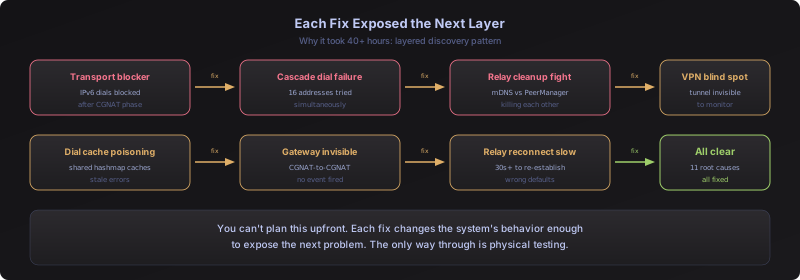
Each fix exposed the next problem. Fixing the transport blocker revealed a dial cache bug. Fixing the dial cache revealed a VPN blind spot. Fixing VPN detection revealed that the daemon couldn’t see switches between two mobile hotspots (both private IPv4, no change visible to the monitor). Every layer peeled back to reveal something deeper.
We also hit hurdles that ate real time:
Operating system surprises: macOS 15 silently blocks daemon TCP connections to local network IPs. The daemon code was correct, the network was reachable, but connections failed with “no route to host.” Hours of investigation before identifying it as a macOS privacy setting, not a code bug.
Wrong assumptions: We initially thought satellite WiFi ARP resolution (60-80 seconds to resolve a LAN address) was causing slow reconnections. After tracing through libp2p’s source code, the real cause was completely different: a shared hashmap caching stale dial errors. The wrong assumption cost investigation time but led us to a deeper, more important fix.
Platform-specific behavior: The macOS route socket was listening for the right events for IPv6 switches, but WiFi hotspot switches fire different message types. And the system command needed its full path (/sbin/route) because the daemon runs under launchd, which has a minimal PATH. Two separate discoveries, each requiring a deploy-test-discover cycle.
Technical highlights
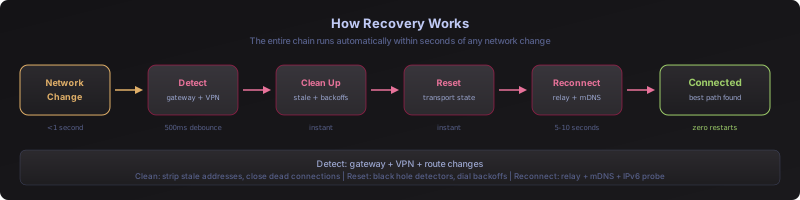
For the technically curious: here’s what we found inside libp2p that needed fixing, and how we fixed each one.
Transport state that outlives network switches
libp2p tracks which transports work and which don’t. After enough IPv6 failures (e.g., on a CGNAT network), it decides “IPv6 is broken” and blocks all IPv6 dials. This state persists even after you switch to a network with working IPv6. The daemon stays on relay when a direct path exists.
Fix: reset the transport state on every network change. A WiFi switch is a definitive event that invalidates all prior transport knowledge.
Shared dial cache poisoning
libp2p creates one dial worker per peer. All dial attempts share a cache. If any subsystem (PeerManager, DHT discovery, autonat) dials a stale address and fails, that error is cached. When mDNS discovers the peer on the new network and tries to dial, it gets the cached error without ever actually dialing.
Fix: three coordinated changes. Strip stale addresses from the peerstore before reconnect (prevents cache poisoning by other subsystems). Probe TCP reachability before calling libp2p’s dial path (prevents self-poisoning). Retry with backoff when the probe fails during WiFi settling.
Invisible network switches
The network monitor only watched global IP addresses. Three categories of switches were invisible: VPN tunnels (private IPv4 only), CGNAT-to-CGNAT carrier switches (no global IPs on either), and WiFi hotspot switches on macOS (fires route changes, not address events).
Fix: three new detection methods. VPN tunnel interface detection by name pattern. Default gateway tracking by parsing the routing table. Route socket expanded to listen for route changes alongside address events.
Relay reconnection defaults
libp2p’s autorelay subsystem is tuned for DHT-discovered relays: 1-hour retry backoff, 30-second query interval, 3-minute boot delay. For known static relays, these defaults meant 30+ second reconnection after a network change.
Fix: backoff reduced to 30 seconds, query interval to 5 seconds, boot delay eliminated. Relay reconnection now takes 5-10 seconds.
All 11 root causes
| # | Root Cause | Fix |
|---|---|---|
| 1 | Transport blocker persists across network switches | Reset on network change |
| 2 | Probe tests relay server IP instead of peer IP | Skip circuit addresses in probe targets |
| 3 | Direct dial tries all addresses, cascade failure | Constrain to confirmed address only |
| 4 | LAN cleanup fights remote node’s reconnect | Let direct and relay coexist |
| 5 | Stale connection checker misses private IPs | Check all interface IPs |
| 6 | Relay dropped on networks with public IPv6 | Permanent relay fallback |
| 7 | LAN upgrade poisoned by transport blocker | TCP-only filter for LAN paths |
| 8 | Valid IPv6 killed during address verification window | Grace period for new addresses |
| 9 | 1-hour relay retry backoff | Reduced to 30 seconds |
| 10 | Reconnect cooldown blocks recovery after disconnect | Clear cooldown on disconnect and network change |
| 11 | Closed connection reported as live for 57 seconds | Check if local IP still exists on any interface |
What’s next
The network layer is now tested against every physical transition we can reproduce. File transfer testing across these same transitions comes next. After that: wiring the reputation system for autonomous peer trust decisions, and the Path Memory feature for scored path caching per network fingerprint.