First External Connection: NZ to AU Over Relay
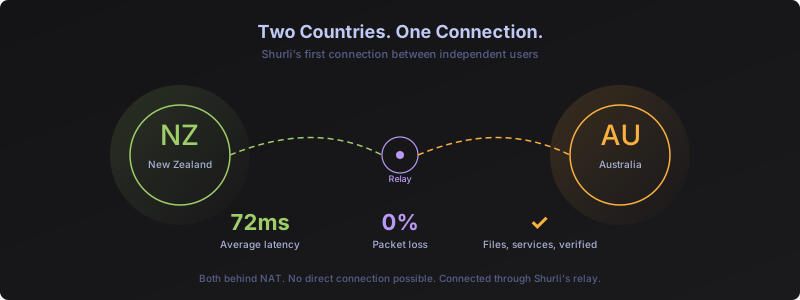
The scenario
An external user in Australia wanted to connect to a node in New Zealand. Two nodes, two countries, both behind NAT. No direct connection possible.
This was unplanned. A spontaneous test of Shurli’s capabilities while still under active development. Every previous test was between controlled devices on the same infrastructure. This was different: a real user, a different ISP, a different country, real problems. No preparation, no staging environment, just “let’s see if it works.”
Onboarding: seconds, not minutes
The invite flow worked end to end:
shurli invite --name "peer-name"Generated a short code. Sent it over a secure channel. The external user ran:
shurli init
shurli join <code> --name <device-name>
The join command itself completed in seconds. Both nodes appeared in each other’s authorized peer list. The relay delivered introductions automatically. Identity verification (emoji + numeric SAS code) was confirmed over a voice call.
Build time is separate. Once the binary exists, onboarding is a two-command operation that takes seconds.
What we found and fixed immediately
After successful pairing, pinging the external node returned an error. The external user’s node also reported a health check warning: “no relay addresses.” Despite being connected to the relay, it couldn’t establish a relay reservation. We identified the root cause and fixed it within minutes.
Root cause: relay data circuits were blocked
Shurli’s public seed relay nodes run in signaling-only mode by default. They handle peer discovery, introductions, and pairing, but block actual data circuits (ping, service proxy, file transfer) unless the relay operator explicitly authorizes specific peers.
This is deliberate. A public relay shouldn’t forward arbitrary data between peers without the operator’s consent. Private relay operators can configure this however they want. The invite flow handles identity exchange, but data circuit authorization is a separate, intentional step controlled by the relay operator.
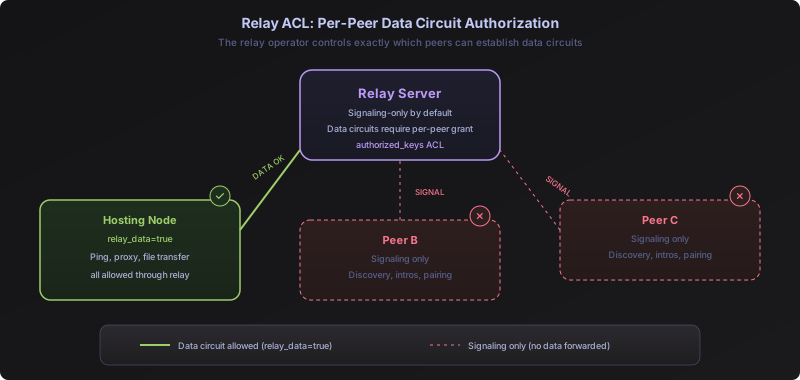
The diagram above shows the key design: relay_data=true is granted to one specific peer, while all other authorized peers remain in signaling-only mode. The relay operator controls exactly which peers can establish data circuits. This is not a global toggle. It is per-peer access control.
The fix: Added relay_data=true to the hosting node’s (which is behind Carrier Grade NAT (CGNAT)) entry in the relay’s authorized keys. Restarted the relay. The external node reconnected. Ping worked immediately.
The numbers
PING peer (via daemon, continuous):
seq=0 rtt=71.6ms path=[RELAYED]
seq=1 rtt=72.9ms path=[RELAYED]
seq=2 rtt=77.7ms path=[RELAYED]
...
13 sent, 13 received, 0% loss, rtt min/avg/max = 65.8/72.2/81.1 ms
NZ to AU, 72ms average, zero loss, all relayed. Clean.
Service proxying worked
After ping confirmed connectivity, the external user was able to proxy services through the relay circuit. By default, Shurli does not expose any services or ports on a node, whether it’s behind CGNAT, NAT, or even on a publicly accessible network. The node operator explicitly configures which services to expose, and Shurli tunnels only those connections through the P2P layer. No port forwarding, no VPN, no firewall changes needed on either side.
File transfer experience over P2P
Next test: file transfer. Controlled devices could already transfer files at decent speeds on LAN. Would it work over a relay circuit between two countries?
First attempt was unsuccessful. The file transfer plugins were configured to reject relay transport by default. Error: “plugin does not allow relay, and peer is only reachable via relay.”
The fix: Updated all file transfer plugins to allow relay transport. But allowing relay transport in the plugin is only half the story. The relay itself still enforces per-peer ACL. Even with the plugin fix, only the specific peer granted relay_data=true on the relay can actually use data circuits. Every other peer, even if authorized and connected, remains in signaling-only mode. The only exception is the relay administrator.
This is why running your own relay matters. A cheap VPS ($5-10/month) gives you full control over which peers get data access, for how long, and with what limits. Relying on public or third-party relays means you’re subject to their policies, their bandwidth limits, and their access decisions. Your own relay, your own rules.
After rebuilding on both sides:
shurli browse <peer>The external user could see the shared files. Then:
shurli download <peer>:<share-id>/medium.bin --dest ~/Desktop --follow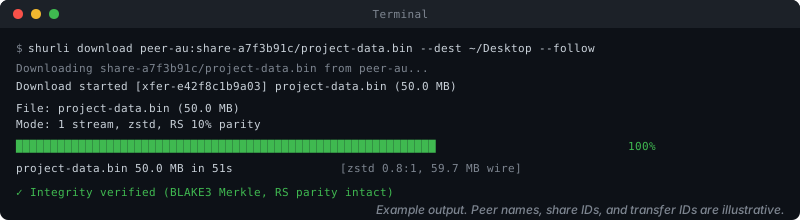 Example output. Peer names, share IDs, and transfer IDs are illustrative.
A 50 MB file transferred successfully from NZ to AU over the relay circuit. The file arrived intact with full integrity verification: content-defined chunking, BLAKE3 Merkle tree, zstd compression, and Reed-Solomon parity encoding.
Public seed relay throughput is intentionally constrained. These shared relays enforce per-session limits to prevent abuse and conserve resources for all users. Direct peer-to-peer connections (when NAT traversal succeeds) bypass the relay entirely.
This is another reason to run your own relay. On a self-hosted relay, you control every parameter: session duration, data limits, per-peer bandwidth, circuit limits. You can configure it as generously as your infrastructure allows. A $5/month VPS with generous bandwidth gives you a private relay with no shared resource constraints, full per-peer ACL control, and throughput limited only by your server’s capacity. Speed optimization across all transport paths is actively in progress, with proper benchmarking on dedicated infrastructure planned before publishing any performance numbers.
What we found and fixed
This single session surfaced 11 UX gaps. Four were fixed during the session itself:
Fixed live:
- Remote service discovery protocol (query a peer’s available services)
- Remote admin command to set relay peer attributes without doing SSH to relay server
- File transfer via relay circuits. Originally, file transfer was restricted to direct and LAN connections only, with relays completely cut off. During this test we revised that decision and enabled relay as a valid transport path, but with per-peer granular access control on the relay side to prevent abuse. Only specifically authorized peers can use data circuits through the relay. Upcoming updates will introduce even richer per-peer permission controls, including time-limited grants and admin-managed access windows
- Improved file transfer progress bar with cleaner visual output across terminal environments including tmux and screen
Documented for follow-up:
- Invite flow should auto-grant relay data access (or surface a clear error)
- “All dials failed” error should mention relay ACL when relevant
- Naming UX during invite/join needs improvement
- Share management needs per-peer add/remove/update (not replace entire list)
- Browse with no visible shares should say so, not return a cryptic stream reset
- Per-peer, time-limited data access grants (admin controls who can transfer, for how long)
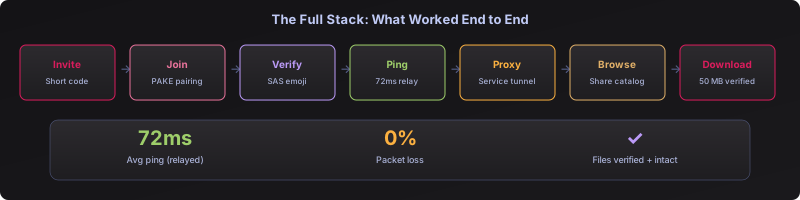
What it proved
The full stack works between independent users on real networks:
Invite -> Join -> Verify -> Ping -> Service Proxy -> Browse -> Download
All over a relay circuit, NZ to AU. Two peers behind NAT, no direct connection possible, communicating through Shurli’s relay infrastructure.
The problems found were all UX and configuration gaps, not protocol failures. The P2P layer, the relay circuit, the identity system, the file transfer pipeline all worked correctly. What broke was the space between features: the onboarding flow didn’t configure data access automatically, error messages didn’t explain what was wrong, and plugin policy was too restrictive for relay-only peers.
Every gap found by an external user in 30 minutes would have taken weeks to discover in a controlled environment. This is why testing with real users on real networks is irreplaceable.
How this gets built
See also: Development Philosophy - the principles behind every decision in this project.
This is worth saying: Shurli has no VC funding, no team of engineers, no marketing department. It’s being built by one person with a Claude Max subscription ($200/month). That’s the entire budget.
The approach is the opposite of what the industry normalizes. No hype cycle. No announcement before the thing works. No pitch deck before the code exists. Build it, test it, fix what breaks, then talk about it. This blog post exists because the test happened spontaneously and worked, not because a launch date was scheduled.
What makes this possible is Claude Code by Anthropic. This isn’t prompt-based development where you ask for snippets and paste them in. It’s intent-based development, more commonly known as agentic coding: you describe what you want to achieve, and Claude reasons through the architecture, writes the implementation, runs the tests, debugs failures, and iterates, all in a continuous workflow. The entire development pipeline, from architecture decisions to implementation, testing, debugging, documentation, and even these blog posts, happens in conversation with Claude. Features that would take a small team weeks get designed, built, tested, and deployed in hours.
Security and code quality are not afterthoughts here. They are the foundation. Every feature goes through multi-round audits, race condition testing, and physical verification on real hardware before it ships. This matters because Shurli is building the networking layer for an AI agentic native P2P network. Infrastructure at this level cannot afford to cut corners. When AI agents autonomously transfer data, negotiate connections, and manage trust, the code underneath must be airtight. That’s a responsibility we take seriously from day one, not something we bolt on after a breach.
This isn’t a testimonial. It’s an observation from someone shipping real infrastructure with it every day. Anthropic built something that fundamentally changes what one person can accomplish.