Phase 6: Your Relay Is Now a Fortress
The problem we solved
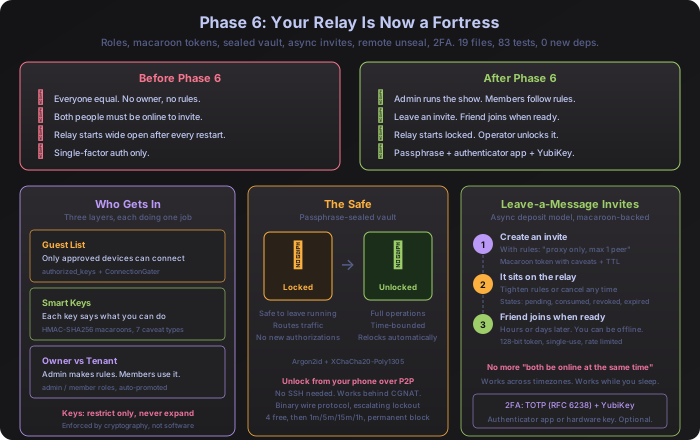
Before Phase 6, your Shurli relay had four gaps:
No owner. Every connected peer had the same privileges. The person who set up the network and the person who joined five minutes ago could both do everything. There was no “admin” and no rules about who could invite new people.
Invites required perfect timing. You create an invite code, send it to a friend. Your friend has to run the join command before the code expires. If they’re asleep, at work, or in a different timezone, the code expires and you start over.
The relay started wide open. Every time the relay restarted (server update, power outage, crash), it came back with full privileges. No locked state. No ceremony. A compromised relay process had instant access to everything.
Single-factor auth. If someone got SSH access to your server, the relay was theirs.
Phase 6 fixes all four.
What shipped
Seven components working together. 19 new files, ~3,655 lines of Go. Zero new external dependencies added.
| Component | What it does | Size | Tests |
|---|---|---|---|
| Role-based ACL | Owner vs member distinction | 65 lines | 6 |
| Macaroon tokens | Smart keys with built-in rules | 268 lines | 32 |
| Invite deposits | Leave-a-message invites | 245 lines | 6 |
| Sealed vault | Locked safe for your relay’s secrets | 454 lines | 14 |
| Remote unseal | Unlock from your phone over P2P | 235 lines | 6 |
| TOTP 2FA | Authenticator app codes | 126 lines | 11 |
| YubiKey 2FA | Hardware key challenge-response | 170 lines | 8 |
All cryptography uses Go’s standard library: crypto/hmac, crypto/sha256, crypto/sha1, and golang.org/x/crypto (which was already in the project from Phase 4). No new dependencies means no new attack surface.
Three layers of access control
Think of it like an apartment building:
- The guest list decides who can walk through the front door.
- Smart keys decide which rooms each person can access.
- The owner badge decides who can change the building rules.
Each layer does one job. They work together but never try to do each other’s work.
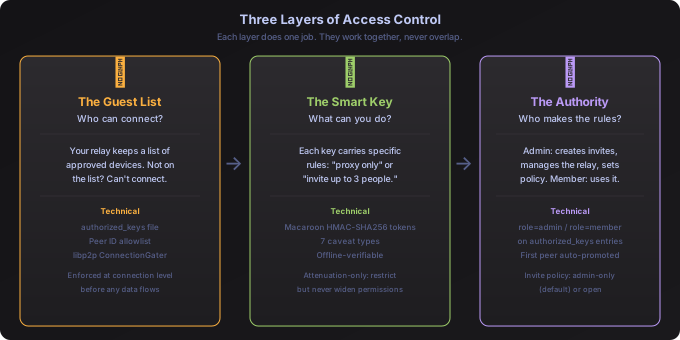
In technical terms, these three layers are:
Layer 1: Identity (authorized_keys). A file listing every peer ID that’s allowed to connect. If your device’s cryptographic identity isn’t on this list, the connection is rejected before any data flows. This uses libp2p’s ConnectionGater interface, the same mechanism from Phase 2.
Layer 2: Permissions (macaroon tokens). Each token carries specific rules: “you can use the proxy service, for the family group, until March 15, for up to 3 people.” These rules are baked into a cryptographic chain that can only be made stricter, never looser. More on this below.
Layer 3: Authority (roles). Two levels: admin and member. Admins create invites, manage the relay, and set policy. Members use the network. The first peer to connect to a fresh relay automatically becomes admin. internal/auth/roles.go, 65 lines, reuses the existing SetPeerAttr() function. No new file format, no new database.
Invite policy is configurable: admin-only (the default) means only admins can create invites. open lets any connected peer invite others.
Smart keys that can only get stricter
This is the concept that makes Phase 6’s permission model work, and it’s worth understanding visually.
Imagine you create an invite with full access. Then you realize your friend should only be able to use the proxy, not SSH. With traditional permissions, you’d have to delete the invite and create a new one. With macaroon tokens, you just add a restriction:
shurli relay invite modify <id> --add-caveat "service=proxy"The key now says “proxy only.” Your friend, whenever they eventually use the invite, gets the restricted version.
The critical property: you can add restrictions but never remove them. This isn’t enforced by software rules that could have bugs. It’s enforced by math.

How the chain works (technical detail)
Each macaroon is an HMAC-SHA256 chain. The root key signs the token identifier to produce the first signature. Each restriction (“caveat”) is hashed into the chain, consuming the previous signature:
sig_0 = HMAC(root_key, identifier)
sig_1 = HMAC(sig_0, "service=proxy")
sig_2 = HMAC(sig_1, "expires=2026-03-15T00:00:00Z")
sig_3 = HMAC(sig_2, "peers_max=1")
To verify, the relay recomputes the entire chain from the root key and compares signatures using hmac.Equal (constant-time comparison). If anyone tampers with a restriction, adds one out of order, or removes one, the chain breaks and the token is rejected.
Removing a restriction would require reversing HMAC-SHA256, which is computationally infeasible. The math guarantees the policy: mistakes can be corrected (add more restrictions), but never made worse.
Seven types of restrictions
| Restriction | Example | What it controls |
|---|---|---|
service | service=proxy,ssh | Which services the key grants access to |
group | group=family | Which group the key belongs to |
action | action=invite,connect | What actions are allowed |
peers_max | peers_max=5 | Maximum number of people this key can onboard |
delegate | delegate=false | Whether the key holder can create sub-keys |
expires | expires=2026-04-01T00:00:00Z | When the key stops working |
network | network=home | Which network namespace the key works in |
Unknown restriction types are rejected (fail-closed design). A token verifier running today cannot be bypassed by a restriction type that doesn’t exist yet.
This is the same HMAC-SHA256 chaining pattern used by the Lightning Network’s LND macaroons, proven at scale in production Bitcoin infrastructure. Implementation: internal/macaroon/macaroon.go (139 lines) + internal/macaroon/caveat.go (129 lines), 32 tests.
Leave-a-message invites
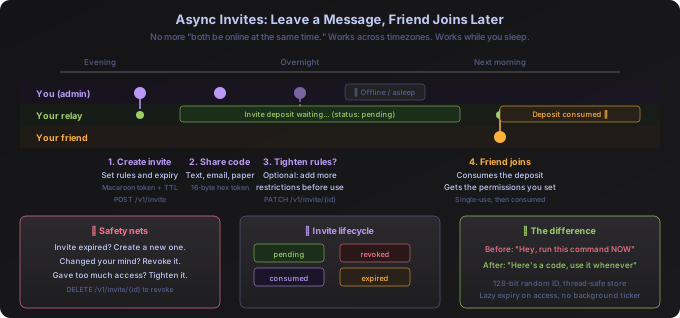
Before Phase 6: “Hey, run this command RIGHT NOW.” Both of you had to be online at the same time.
After Phase 6: “Here’s an invite code, use it whenever you’re ready.” You can be asleep when your friend joins.
How it works
An admin creates an invite deposit on the relay. The deposit is a macaroon token with whatever restrictions the admin chose, stored on the relay until someone uses it.
# On your relay server (SSH or local terminal):
shurli relay invite create --ttl 72h --caveat "peers_max=1"

# Share the code with your friend. They run this on their computer:
shurli join --deposit <deposit-id> --relay <relay-addr>
The relay invite commands talk to the relay through a local Unix socket, so you run them on the relay server itself (directly or via SSH). Your friend’s join command, on the other hand, runs from their own device and connects over the P2P network.
While the invite sits waiting, the admin can:
- Tighten the rules further (add more caveats)
- Revoke it entirely if they change their mind
- Check its status (pending, consumed, revoked, expired)
- Do nothing and let it expire naturally after the TTL
What the admin cannot do: loosen the rules. That’s the attenuation-only guarantee from the macaroon chain.
Technical details
The DepositStore (internal/deposit/store.go, 245 lines) manages invite deposits in memory with sync.Mutex for thread safety. Each deposit has a 16-byte random hex ID (128-bit entropy). Four lifecycle states: pending -> consumed | revoked | expired.
Auto-expiry is lazy: deposits are checked when accessed, not by a background ticker. CleanExpired() garbage-collects old entries. Storage is in-memory now; the interface supports adding persistence later without changing the API. Relay admin endpoints: POST /v1/invite (create), GET /v1/invite (list), DELETE /v1/invite/{id} (revoke), PATCH /v1/invite/{id} (modify).
The vault: locked by default
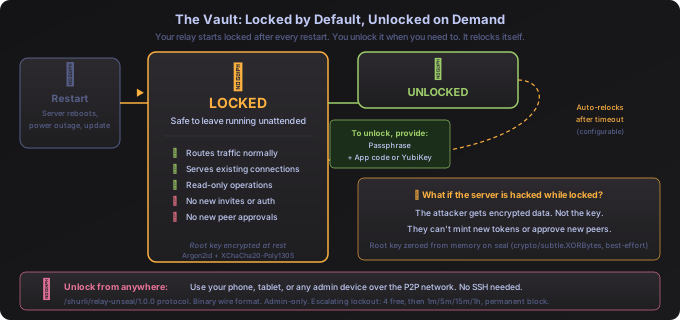
Your relay holds a secret key used to create invite tokens. Before Phase 6, that key sat in memory, unprotected. Now it lives inside a vault that’s locked by default and unlocks only when you tell it to.
Two modes
Locked (default after every restart): Your relay keeps running normally. It routes traffic, serves existing connections, handles read-only requests. But it cannot create new invites, approve new peers, or mint new tokens. The secret key is encrypted on disk and not in memory. If an attacker compromises the server while the vault is locked, they get encrypted data, not the key.
Unlocked (when you need it): Full operations. You provide a passphrase (plus an optional authenticator app code or YubiKey), and the vault decrypts the secret key into memory. After a configurable timeout, the vault automatically relocks and the key is wiped from memory.
Disaster recovery
When you first set up the vault with shurli relay vault init, you get a seed phrase: 32 random bytes displayed as 24 hex pairs. This seed can reconstruct your relay’s identity if the passphrase is ever lost. Write it down. Store it offline. It’s the last resort.
Inspired by operators who chose to shut down rather than compromise their users.
Technical details
Key derivation: Argon2id with time=3, memory=64MB, threads=4, keyLen=32. Encryption: XChaCha20-Poly1305 (24-byte nonce, authenticated encryption). The SealedData struct is persisted as JSON. On seal, the root key is zeroed via crypto/subtle.XORBytes.
Honest limitation: Go’s garbage collector cannot guarantee deterministic memory zeroing. If the GC copies the key before zeroing, a memory dump could theoretically recover it. The zeroing is defense-in-depth, not a hardware guarantee. The real protection is time-bounding the unseal window and auto-resealing.
Implementation: internal/vault/vault.go (454 lines), 14 tests covering create/save/load/unseal/seal cycles.
Unlock from your phone
After a restart, the vault is locked. You need to unlock it. But you might be on your phone behind CGNAT, on a tablet at a cafe, or simply away from your SSH setup.
Shurli lets any admin peer unlock the vault over the existing P2P network. No SSH. No VPN. No new ports.
# From any device where you're an admin, on any network
shurli relay unseal --remote my-relay
Use the relay’s short name (from your config), a peer ID, or a full multiaddr. The command prompts for your passphrase and optional TOTP code, then sends them over the encrypted P2P connection. The relay checks your admin status before even reading the passphrase. Non-admins are rejected immediately.
Technical details
Protocol: /shurli/relay-unseal/1.0.0, custom binary wire format:
Request:  [1 version][2 BE passphrase-len][N passphrase][1 TOTP-len][M TOTP]
Response: [1 status][1 msg-len][N message]
Why binary instead of JSON? Each field has an explicit, bounded length. JSON parsers accept arbitrarily large inputs by default, making resource exhaustion attacks easy. Binary with length prefixes rejects oversized payloads at the byte level.
iOS-style escalating lockout: 4 free attempts for typos, then 1 minute, 5 minutes, 15 minutes, 1 hour (x3). After that, the peer is permanently blocked from remote unseal and must SSH to the server to fix it. Successful unseal resets the counter. 30-second read deadline prevents slow-loris attacks.
Two-factor authentication
Two options, both optional, both using only Go’s standard library:
Authenticator app (TOTP): Works with Google Authenticator, Authy, or any standard TOTP app. The relay generates a QR-scannable otpauth:// URI during setup. Six-digit codes, 30-second window with drift tolerance. internal/totp/totp.go, 126 lines, 11 tests including the RFC 6238 test vectors.
Hardware key (YubiKey): HMAC-SHA1 challenge-response via the ykman CLI. If you have a YubiKey and ykman installed, the option appears. If you don’t, it doesn’t. The binary stays pure Go; the YubiKey integration shells out to the external tool. 15-second timeout for touch-required keys. internal/yubikey/challenge.go, 170 lines, 8 tests.
Both secrets are encrypted inside the vault alongside the root key. Decrypted only during unseal. Zeroed when the vault relocks.
What could go wrong (and what we did about it)
Every security feature has an attack surface. Here’s what Phase 6 was designed to resist:
| What could happen | How it’s handled |
|---|---|
| Someone fakes an admin identity | Can’t: peer IDs are cryptographic (libp2p ed25519 keys) |
| Admin’s device is stolen | Escalating lockout (4 free, then 1m/5m/15m/1h, then permanent block) + 2FA |
| Brute-force remote unseal | After 10 wrong attempts, permanently blocked. Must SSH to fix. |
| Attacker guesses an invite code | 128-bit entropy (2^128 possibilities), rate limited, auto-expires |
| Flood of fake join requests | Per-peer invite quotas, total caps, admin can revoke |
| Someone intercepts an invite in transit | All P2P streams use Noise encryption, MITM is infeasible |
| Same invite used twice | Single-use: consumed on first use, rejected after |
| Server hacked while vault is locked | Secrets encrypted at rest, key not in memory |
| Server hacked while vault is unlocked | Key in memory, bounded by auto-reseal timeout |
The honest limitation: Go’s garbage collector means we can’t guarantee the secret key is perfectly erased from memory when the vault relocks. A sophisticated attacker with access to process memory during the unlock window could theoretically extract it. The mitigation: keep the unlock window short and let auto-reseal do its job.
Observability: every operation is measured
All seven Phase 6 components are fully instrumented with Prometheus metrics. 10 new counters, gauges, and histograms bring the total to 30 custom metrics across Shurli, with 6 new Grafana panels in a dedicated Security section.
| Metric | Type | What it tracks |
|---|---|---|
shurli_vault_sealed | Gauge | 1 = locked, 0 = unlocked. Instant dashboard visibility. |
shurli_vault_seal_operations_total | Counter | Seal/unseal events by trigger (seal_admin, unseal_admin, unseal_remote, auto_seal) |
shurli_pairing_total | Counter | Pairing attempts by result (success, failure) |
shurli_deposit_operations_total | Counter | Invite deposit lifecycle (create, revoke, modify, consume) |
shurli_deposit_pending | Gauge | Current count of pending invite deposits |
shurli_admin_request_total | Counter | Admin socket requests by endpoint and HTTP status |
shurli_admin_request_duration_seconds | Histogram | Admin socket request latency by endpoint |
shurli_vault_unseal_total | Counter | Remote unseal attempts by result |
shurli_vault_unseal_locked_peers | Gauge | Peers currently locked out by escalating lockout |
shurli_macaroon_verify_total | Counter | Macaroon verification attempts by result |
Every metric helper is nil-safe: if Prometheus is disabled (the default for home nodes), the handlers work identically with zero overhead. Metrics activate only when --metrics-addr is set.
The pre-built Grafana dashboard now ships with 37 panels (31 visualizations + 6 row headers) covering network health, proxy throughput, authentication, and the full Phase 6 security surface. Import the JSON, point it at your Prometheus instance, and every vault state change, pairing attempt, and invite operation shows up in real time.
Where this leads
Phase 6 isn’t the end goal. It builds the foundation for what comes next:
Phase 6 (now):   Macaroon tokens handle permissions.
                 authorized_keys handles identity.
                 Both coexist.

Phase 7 (next):  Zero-knowledge proofs let you prove
                 "I have a valid token" without showing
                 the token itself.

Future:          authorized_keys becomes optional.
                 Macaroons (or UCANs) carry everything.
You can’t build “prove you’re authorized without revealing your identity” until authorization itself is well-defined. Phase 6 defines it. Everything built here is a stepping stone, not a dead end. Nothing needs to be torn out when the next phase arrives.
Impact
| Before Phase 6 | After Phase 6 | |
|---|---|---|
| Who’s in charge? | Everyone equal | Admin and member roles |
| How invites work | Both online at the same time | Leave a message, join anytime |
| Permission detail | All or nothing | 7 restriction types, composable |
| Fix a mistake | Delete and start over | Tighten in-place (restrict-only) |
| Relay after restart | Wide open, full privileges | Locked, watch-only |
| Login security | Identity only | Passphrase + app code + hardware key |
| Remote management | SSH only | Unlock from any admin device over P2P |
| Secrets on disk | Plaintext | Encrypted (Argon2id + XChaCha20-Poly1305) |
| Observability | None for security ops | 10 new Prometheus metrics, 6 Grafana panels |
| New dependencies | 0 | |
| New code | 19 files, ~3,655 lines | |
| New tests | 83 |
Seven components. 19 files. 83 tests. Zero new dependencies. The relay is no longer a dumb pipe. It’s a fortress that starts locked, unlocks on command, and locks itself again when you walk away.