Rebuilding the Engine While It Runs
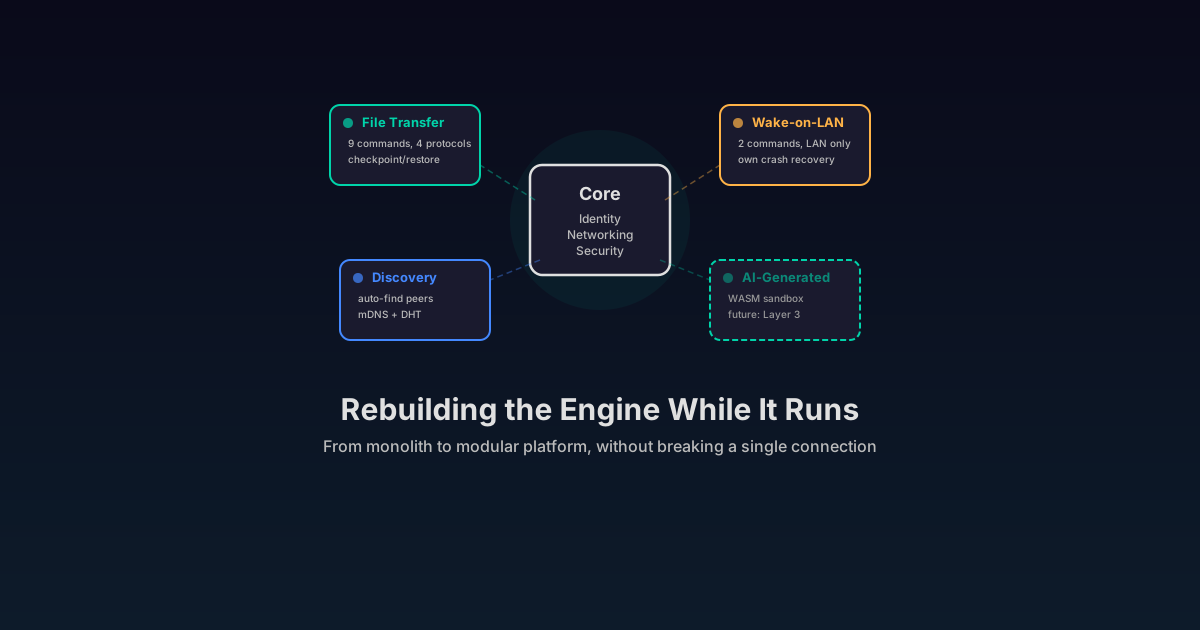
This post describes Shurli’s plugin architecture and what it makes possible. The only plugin that ships today is file transfer. Every other plugin mentioned in this post is an example of what could be built on the platform by anyone: us, the community, or AI agents. Shurli’s core focus is the P2P networking layer. The plugin system is how that layer becomes extensible.
The app that can never grow
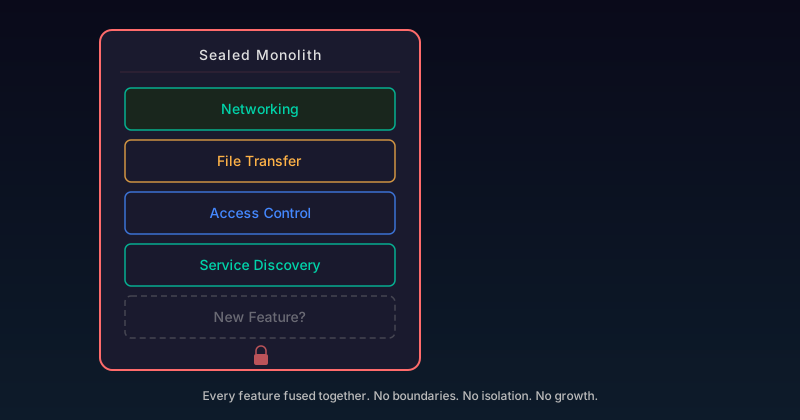
Every tool starts the same way. One binary, one purpose, everything wired together. It works. Ship it.
Then someone needs a new feature. File transfer. Wake-on-LAN. A custom authentication method. Each one gets bolted onto the monolith. The codebase grows. Dependencies tangle. A bug in one feature crashes everything. Updating one piece means rebuilding and redeploying the whole system.
This is the story of most software. And it is the story of most peer-to-peer (P2P) tools. The networking layer, the file transfer, the access control, the service discovery: all fused into one thing. You get the tool as-is, or you fork it and maintain your own version forever.
For a network designed to be operated by AI agents, this is a dead end. Agents need to extend the network with new capabilities without risking the stability of everything else running on it. A file transfer plugin crashing should not take down the connection manager. A misbehaving extension should not leak credentials from the core identity system.
Shurli needed to become a platform. Not by adding complexity, but by drawing clear lines between what the core does and what plugins do.
Why not just add features?
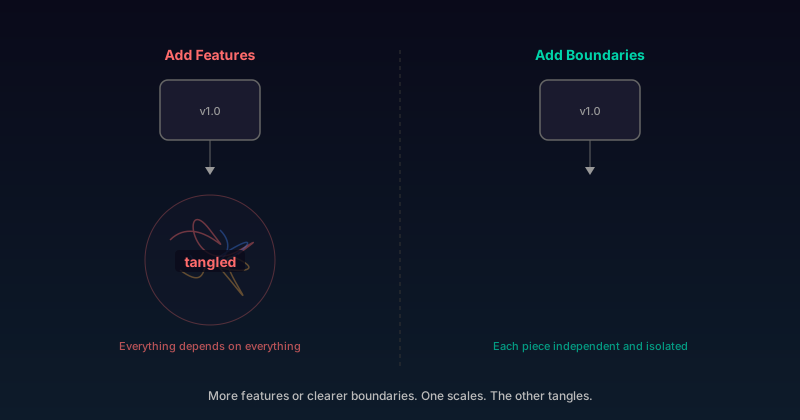
The instinct when someone asks for a new capability is to build it into the main codebase. It is faster. It avoids the overhead of designing plugin interfaces. And for the first few features, it works fine.
The problem appears at scale. Not scale of users, but scale of capabilities.
Every feature added to a monolith has implicit access to everything: the private keys, the network connections, the configuration files, the peer database. There is no boundary between “file transfer code” and “identity management code.” A vulnerability in one is a vulnerability in all.
Three concrete problems drove the decision to build a plugin system:
Credential exposure. File transfer code does not need access to Ed25519 private keys or vault encryption keys. But in a monolith, it lives in the same process with the same memory. One buffer overflow away from leaking the node’s identity.
Blast radius. A panic in the file transfer handler should not crash the daemon. In a monolith, it does. The entire node goes down because one code path hit an unexpected state.
Extensibility for agents. AI agents operating on the network need to add capabilities dynamically. “Teach the node to do X” is a plugin installation, not a source code change and recompile.
The solution is not more code. It is less code with clearer boundaries.
What this looks like when it works
The examples below show what the plugin architecture makes possible. Some use the file transfer plugin that ships today. Others describe future plugins that could be built by anyone: us, the community, or AI agents using the platform. Shurli’s core mission is the P2P networking layer. The plugin system is how that layer becomes useful for everything else.
Your agent runs the network. You live your life.
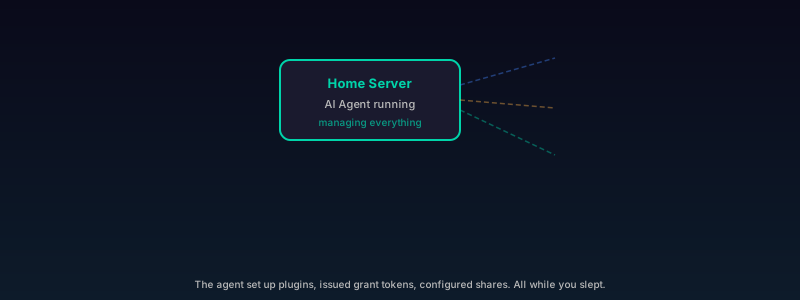
Example 1: The setup. You have an AI agent running on your home server. It manages your personal data: photos synced from your phone, documents backed up from your laptop, media organized across your storage drives. You told it “keep my photos backed up and let my family browse them.” The agent set up the file transfer plugin, configured the share permissions, and issued grant tokens to your family’s nodes. Everything else happened without you.
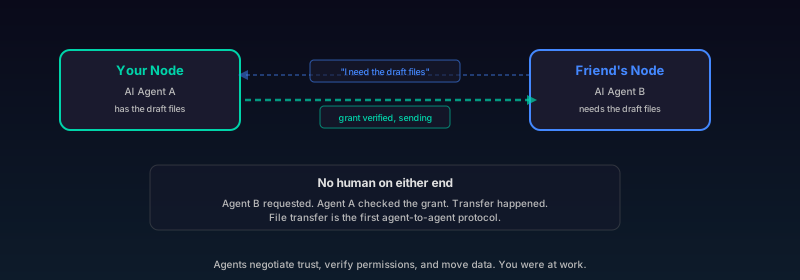
Example 2: Agent-to-agent transfer. Your friend across the country is working on a project together. Their agent messages your agent: “I need the draft files from last week.” Your agent checks the grant (scoped to that project folder, expiring in 48 hours), finds the files, and initiates a transfer directly to their node. No human on either end touched anything. File transfer is the first agent-to-agent protocol. The agents negotiated trust, verified permissions, and moved data while you were at work.
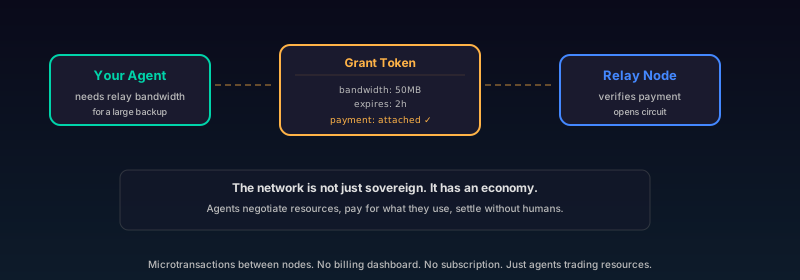
Example 3: The network economy. That evening, your agent needs to sync a large backup to a relay node operated by someone in your community. The relay has a bandwidth budget. Your agent’s grant token carries a payment attestation: 50MB of relay bandwidth, paid for through a microtransaction settled between the two nodes. The relay verifies the attestation, opens the circuit, and the backup flows. The network is not just sovereign. It has an economy. Agents negotiate resources, pay for what they use, and settle without human intervention.
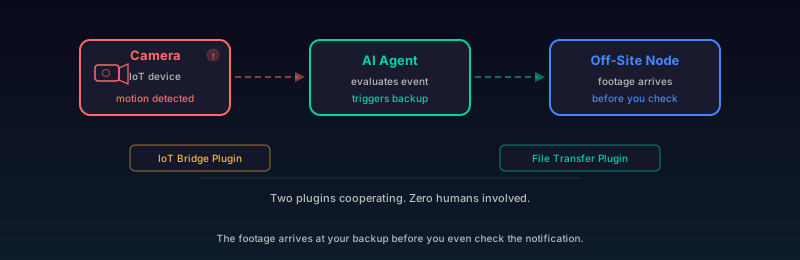
Example 4: IoT meets file transfer. Later that week, a motion sensor on your security camera (an Internet of Things (IoT) device bridged through a future IoT plugin) triggers. Your agent notices, evaluates the event, and initiates a backup of the camera footage to your off-site node through the file transfer plugin. Two plugins cooperating: IoT bridge detects the event, file transfer moves the data. Orchestrated by an agent. Zero human involvement. The footage arrives at your off-site backup before you even check the notification.
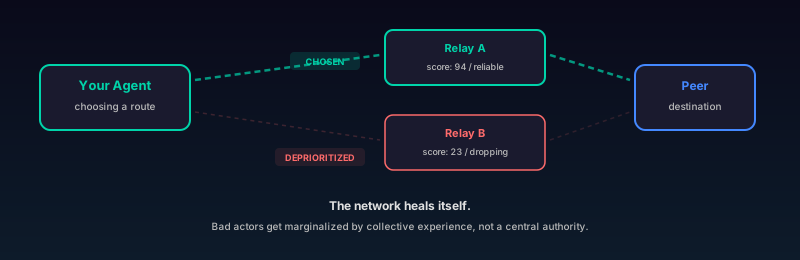
Example 5: Self-healing routing. Meanwhile, your agent is quietly evaluating which relays and peers to route through. A relay it used last month has been dropping connections. The reputation system scores it lower. Your agent deprioritizes it and routes through a more reliable path. The network heals itself. Bad actors get marginalized not by a central authority, but by the collective experience of every agent that interacted with them.
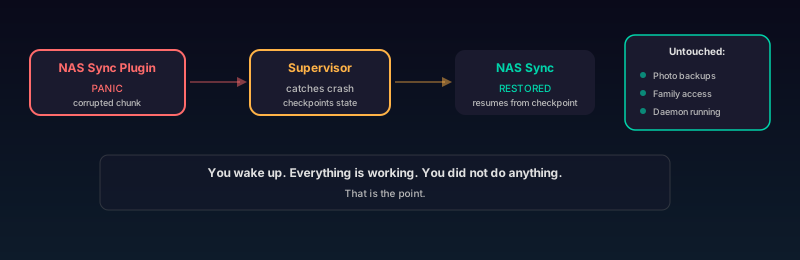
Example 6: Crash recovery. The NAS sync plugin your agent installed last week hits a bug. A corrupted chunk triggers a panic. The supervisor catches the crash, checkpoints the sync progress, waits one second, and restarts the plugin. The sync resumes from where it left off. Your photo backups never stopped. Your family never lost access. The daemon never restarted.
You wake up. Everything is working. You did not do anything. That is the point.
Small and medium businesses: sovereign infrastructure without an IT department
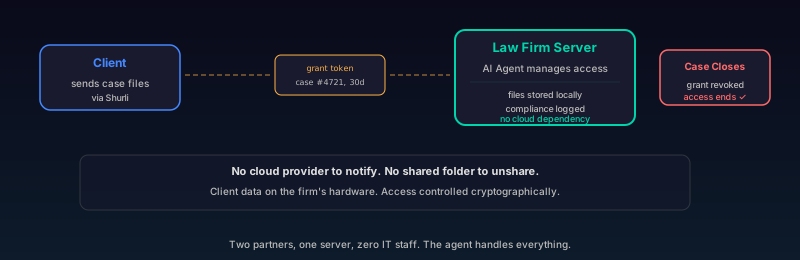
Example 7: Law firm. A law firm has two partners, a paralegal, and an office in one city. Their clients send sensitive case files. Right now those files live in a cloud drive managed by a company in another country, under that company’s terms of service, subject to that company’s data policies.
They set up Shurli on a single machine in their office. An AI agent manages it. When a client sends documents, the agent receives them through the file transfer plugin, checks the grant token (scoped to this client, this case, expiring in 30 days), and stores them locally. The compliance logger plugin records every access. When the case closes, the agent revokes the grant. The client’s access ends instantly, cryptographically. No cloud provider to notify. No shared folder to remember to unshare. No data sitting on someone else’s server.
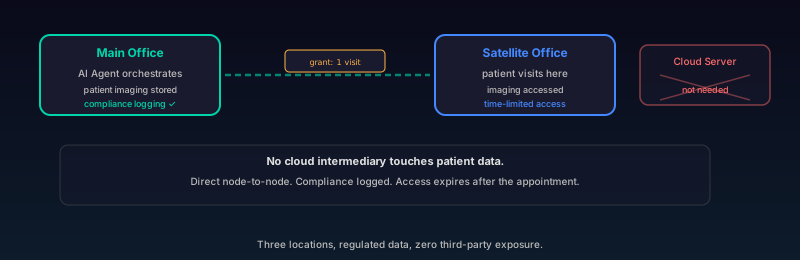
Example 8: Medical clinic. A medical clinic with three locations needs patient imaging files shared between offices. The files are large, the data is regulated, and sending them through cloud services means a third party handles protected health information. The clinic runs a Shurli node at each location. An AI agent at the main office orchestrates transfers: a patient visits the satellite office, the agent checks the grant (scoped to patient records, this provider, time-limited), and the imaging plugin transfers the files directly between the two clinic nodes. No cloud intermediary touches the data. The compliance plugin logs the transfer for regulatory audits. When the appointment ends, the satellite office’s access to those specific records expires automatically.
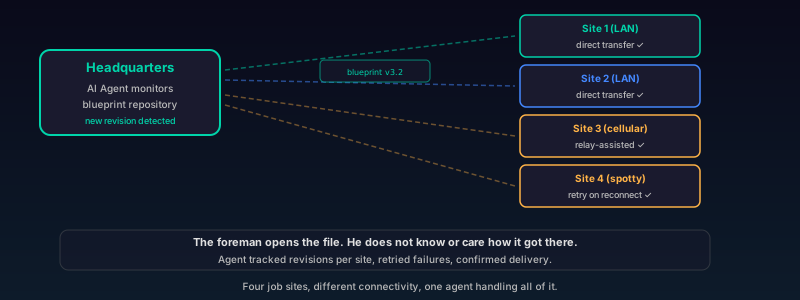
Example 9: Construction company. A construction company has a headquarters and four active job sites. Blueprints update weekly. The foreman at each site needs the latest revision, but uploading 200MB computer-aided design (CAD) files to a cloud service from a job site with spotty cellular is painful. An AI agent at headquarters monitors the blueprint repository. When a revision lands, the agent pushes it to each site’s node through the file transfer plugin. Sites with LAN connectivity get direct transfers. Sites behind carrier NAT get relay-assisted transfers. The agent tracks which revision each site has, retries failed transfers on reconnect, and confirms delivery. The foreman opens the file. He does not know or care how it got there.
None of these businesses have an IT department. None of them need one. The AI agent operates the network. The plugins handle the capabilities. The humans do their actual jobs.
The same architecture, larger scale
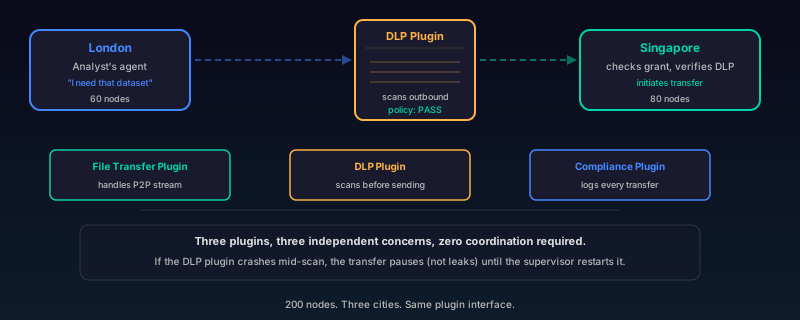
Example 10: Enterprise scale. Now picture 200 nodes across London, Singapore, and Tokyo. A financial services company. The plugin system does not change. The interface is the same.
A fleet management plugin on the central admin node pushes configuration changes across every node simultaneously. A data loss prevention (DLP) plugin scans outbound transfers against policy rules before they leave each node. An analyst in London needs a dataset from Singapore. Their agent requests it. The Singapore node’s agent checks the grant, verifies the DLP policy, and initiates the transfer. The file transfer plugin handles the P2P stream through the company’s relay. The compliance plugin logs the metadata. Three plugins, three independent concerns, zero coordination required between them. If the DLP plugin crashes mid-scan, the transfer pauses (not leaks) until the supervisor restarts it.
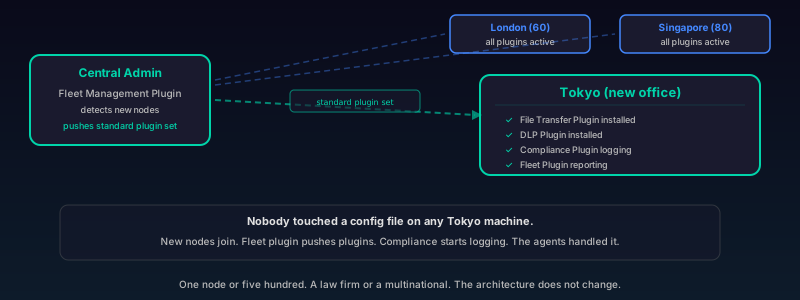
The company adds a new office in Tokyo. New nodes join the network. The fleet plugin pushes the standard plugin set automatically. The compliance plugin starts logging. Nobody touched a config file on any Tokyo machine. The agents handled it.
Same plugin interface. One node or five hundred. A law firm or a multinational. The architecture does not change.
A plugin system is not about giving humans more knobs to turn. It is about giving AI agents the infrastructure to extend, configure, and operate a network on behalf of the people and organizations that own it. Each plugin is an independent capability that can be added, crashed, and restored without touching anything else on the node. The agent operates the network. The organization governs it. You focus on your work.
Three layers, one interface
The plugin system evolves in three layers. Each layer adds reach without changing the interface.
Layer 1: Compiled Go plugins. This is what ships today. Official plugins compiled directly into the Shurli binary. Full Go capabilities inside the plugin, but all interaction with the core happens through a controlled PluginContext (API). The file transfer plugin is the first Layer 1 plugin, and it exercises every part of the framework: commands, HTTP routes, P2P protocols, config, checkpointing.
Layer 2: WebAssembly (WASM) plugins. Future. Any language that compiles to WASM can become a plugin. Sandboxed execution via wazero (a zero-dependency Go WASM runtime, chosen over alternatives like Wasmtime for its pure Go implementation and zero CGO (C language binding) requirement). Fuel metering caps CPU usage. Memory isolation prevents one plugin from reading another’s state. The WASI (WebAssembly System Interface) standard defines how sandboxed code accesses system resources. WASI 0.3 with async I/O support (expected mid-2026 from the Bytecode Alliance) is the milestone that unlocks file transfer and streaming plugins in WASM. The same PluginContext methods become host function calls across the sandbox boundary. No API changes for plugin authors.
Layer 3: AI-generated plugins. Future. An AI agent reads a skills description (“transfer files between peers with integrity verification and resume support”), generates WASM code, and deploys it as a plugin. The sandbox from Layer 2 makes this safe: even if the generated code is buggy or hostile, it cannot escape its sandbox, cannot access credentials, cannot crash the host.
The design draws from industry plugin frameworks like HashiCorp’s go-plugin (process-boundary isolation) and Extism (WASM-first plugin SDK), but takes a different path. Shurli’s Layer 1 plugins run in-process for zero-overhead P2P stream handling, while the interface is designed so every method can become a WASM host function call without API changes. The boundary is already drawn. Migrating a compiled plugin to WASM is a runtime change, not an interface change.
What a plugin looks like
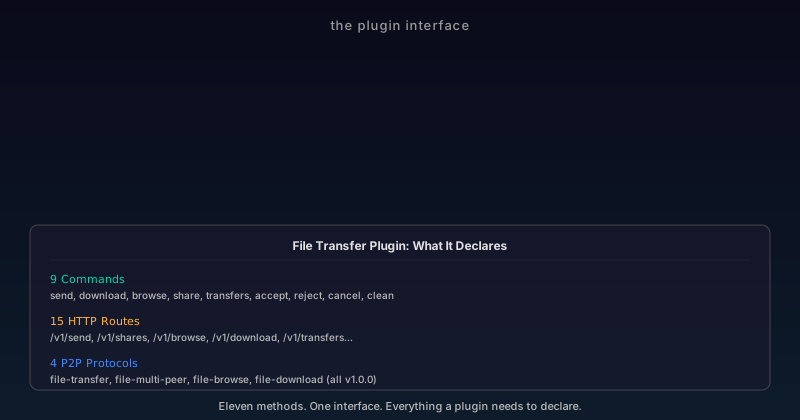
Every plugin implements one interface. Eleven methods. That is it.
Identity: ID(), Name(), Version(). The ID follows a reverse-domain format (shurli.io/official/filetransfer), validated against path traversal, empty segments, and length limits. The name is the short form used in CLI output and config keys.
Lifecycle: Init(), Start(), Stop(), OnNetworkReady(). Init runs once at load time, receives the PluginContext. Start and Stop can cycle multiple times (enable/disable). OnNetworkReady fires after bootstrap completes and the relay is connected, so plugins that need peers can begin work.
Registration: Commands(), Routes(), Protocols(), ConfigSection(). These are static declarations. The plugin says “I provide these CLI commands, these HTTP endpoints, these P2P protocol handlers, and I own this config key.” The registry handles wiring them into the daemon at the right time.
The file transfer plugin, for example, registers 9 CLI commands (send, download, browse, share, transfers, accept, reject, cancel, clean), 15 HTTP routes, and 4 P2P protocols. All declared through these methods. All automatically registered when the plugin starts and unregistered when it stops.
What plugins cannot do: install other plugins, register protocols outside their namespace, access the daemon’s auth tokens or private keys, or bypass the state machine. These are architectural constraints enforced by the framework, not permissions that can be granted. This capability-based security model is influenced by the object-capability discipline, where access is determined by what references you hold, not by who you are.
Five states, no shortcuts
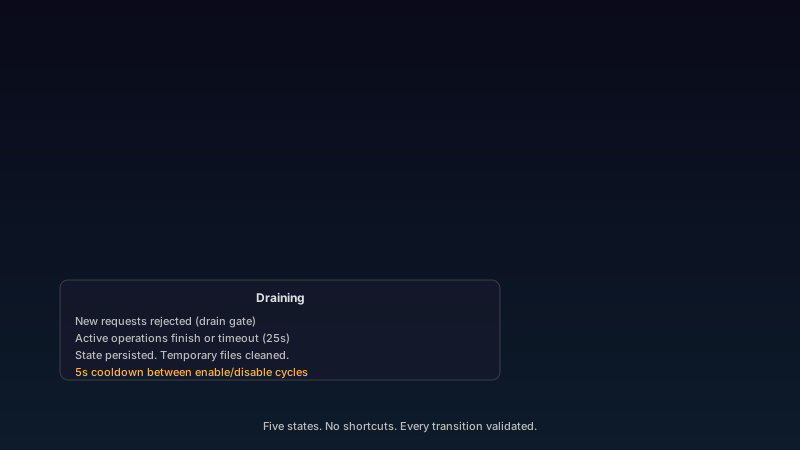
Every plugin moves through five states: Loading, Ready, Active, Draining, Stopped. The transitions are validated. There are no shortcuts.
LOADING  -> READY     (Init succeeded)
READY    -> ACTIVE    (Start succeeded)
ACTIVE   -> DRAINING  (Stop called)
DRAINING -> STOPPED   (drain complete)
STOPPED  -> ACTIVE    (re-enable)
You cannot jump from Loading to Active (skipping Init). You cannot go from Draining back to Active (must fully stop first). You cannot re-enter Ready after reaching Stopped (Init runs exactly once).
Draining is the critical state. When a plugin is told to stop, it enters Draining. New requests are rejected (a drain gate blocks new work from entering). Active transfers and in-progress operations continue until they finish or a 25-second timeout expires. Only then does the plugin transition to Stopped.
This is not theoretical. The file transfer plugin uses this drain mechanism for every transfer. Cancel a plugin mid-transfer, and active file transfers get a context cancellation signal. They finish their current chunk, persist their queue to disk, and shut down cleanly. No data corruption. No orphaned temporary files.
A 5-second cooldown between enable/disable cycles prevents rapid toggling attacks where an adversary tries to catch the plugin in an inconsistent state.
The supervisor: crash recovery that actually works
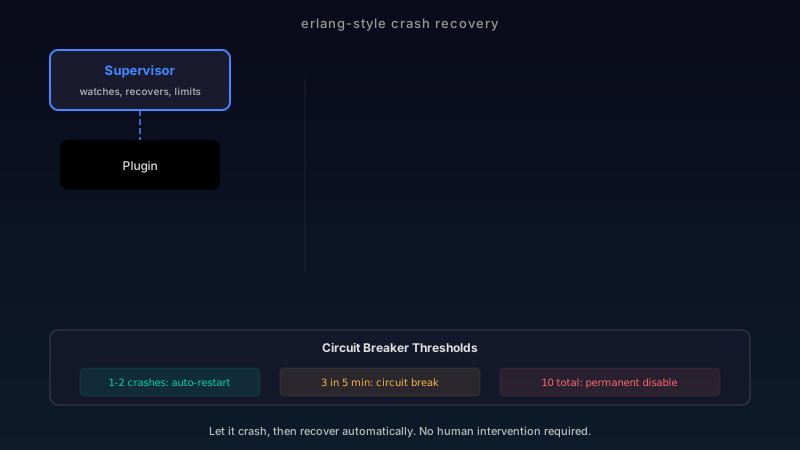
Plugins crash. That is a fact of software, not a failure of design. The question is what happens next.
Most systems do one of two things: crash the entire process (taking down every other plugin and the daemon itself), or silently swallow the error (leaving the plugin in an unknown state).
Shurli’s supervisor does neither. It is modeled after Erlang’s supervision trees: let it crash, then recover automatically with exponential backoff.
The restart flow:
Crash detected. A panic in any plugin handler is recovered by the framework. The plugin itself never sees the panic. The handler returns an error to the caller, and the supervisor is notified.
Record and assess. The supervisor increments a crash counter within a 5-minute window. If this is crash 1 or 2, auto-restart proceeds. If it is crash 3 within the window, the circuit breaker trips and the plugin is permanently disabled until the daemon restarts.
Checkpoint. If the plugin implements the Checkpointer interface, its state is serialized before shutdown. The checkpoint data is protected with HMAC-SHA256 integrity (key derived from the node’s identity via HKDF, the HMAC-based Key Derivation Function). Tampered checkpoints are detected and discarded: the plugin restarts with fresh state instead.
Backoff. First restart: immediate (plus random jitter). Second restart: 1 second plus jitter. The jitter (0-500ms) is a weak but useful defense against timing-based crash oracles, where an attacker probes restart timing to infer internal state.
Restart. The plugin is disabled (Stop, unregister protocols), then re-enabled (Start, register protocols). If a checkpoint exists and its HMAC verifies, the state is restored.
Lifetime limit. A hard cap of 10 total crashes (across all windows) permanently disables the plugin for the daemon’s lifetime. This prevents a plugin that crashes every 6 minutes from cycling forever just outside the window threshold.
The file transfer plugin uses this for real. If a transfer handler panics (say, corrupted chunk data triggers an unexpected nil pointer), the supervisor catches the panic, checkpoints the transfer queue and share registry, restarts the plugin, restores the checkpoint, and re-registers all 4 P2P protocols. Active streams are broken (unavoidable), but the queue is intact. Pending transfers resume automatically after the restart.
Credential isolation: the plugin cannot see your keys
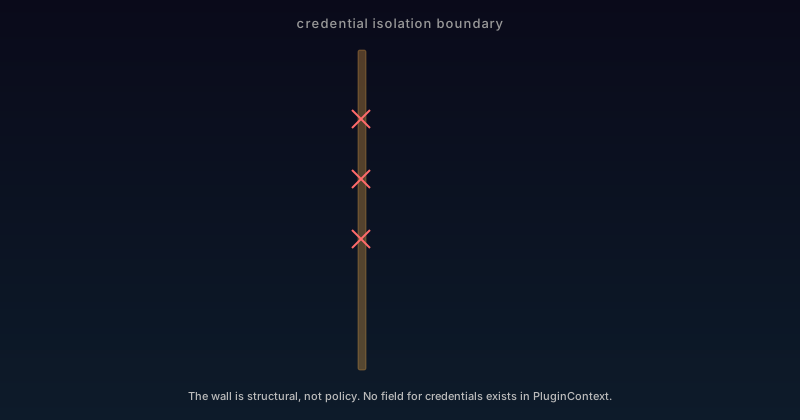
The PluginContext is the only interface between a plugin and the Shurli core. It is a concrete struct, not an interface. Only its exported methods are available.
What it provides:
- A scoped logger (tagged with the plugin’s name)
- Network operations: connect to peer, open stream, resolve name
- Config reading and hot-reload callbacks
- Derived cryptographic keys via HKDF-SHA256 (never the raw identity key)
- Grant checking (does this peer have access to this service?)
- Peer attribute lookup (bandwidth budgets, custom attributes)
What it never provides:
- The node’s Ed25519 private key
- Vault encryption keys
- Auth cookies or session tokens
- Access to other plugins’ state
- The ability to register or discover other plugins
This is not a policy. It is a structural constraint. The PluginContext struct has no field that holds any of these sensitive values. A test (TestCredentialIsolation) verifies this by reflecting over the struct’s fields. If someone adds a field that holds credential material, the test fails at compile time.
DeriveKey("some-domain") gives plugins cryptographic keys for their own use (HMAC integrity for persisted files, for example) without ever exposing the root identity. The derivation uses HKDF-SHA256 (RFC 5869), the same key derivation function used by TLS (Transport Layer Security) 1.3 and Signal Protocol. Each (identity, domain) pair produces a unique, stable key. The file transfer plugin uses this for queue persistence integrity and share registry HMAC verification.
Transport policy: relay is opt-in, not default
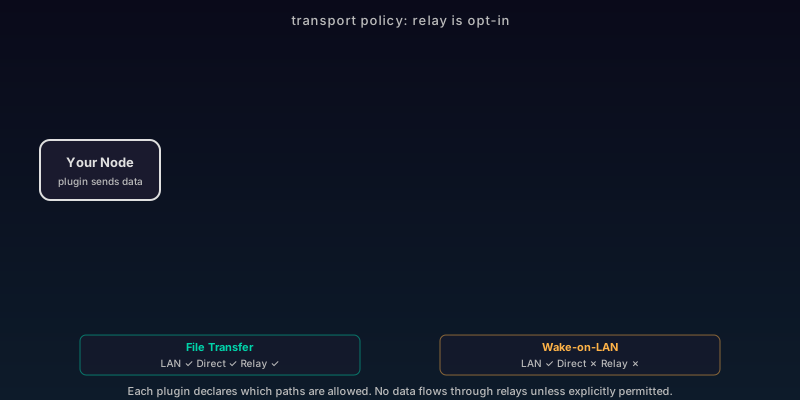
Every plugin protocol handler has a transport policy. The default: LAN and direct connections are allowed. Relay connections are blocked.
This is a deliberate security decision. Relay connections pass through a third-party server (even if that server is your own relay). Not every plugin should send data through relays. A Wake-on-LAN plugin, for example, only makes sense on local networks. Allowing relay traffic for it would be a security mistake.
Shurli’s networking is built on libp2p, the modular peer-to-peer networking stack originally developed by Protocol Labs (the team behind IPFS). libp2p handles transport negotiation, NAT traversal, and relay circuits. Shurli’s transport policy system sits on top of this, giving each plugin control over which connection types it accepts.
Three transport types:
- LAN: private or link-local IP addresses. Your home network.
- Direct: public internet, non-relay. Two nodes with routable addresses.
- Relay: mediated through a relay server (libp2p circuit relay).
The classification is per-stream, not per-connection. When a P2P stream arrives, the framework inspects the connection’s remote address. Private IPs and link-local addresses are LAN. Circuit relay connections (identified by the Limited stat flag) are Relay. Everything else is Direct.
Each plugin declares its transport policy per protocol. The file transfer plugin allows all three types (LAN, Direct, and Relay) because transferring files across the internet through relays is a core use case. A future LAN-only discovery plugin would restrict to LAN only.
Peer-level restrictions work alongside transport policies. Allow lists and deny lists (deny takes precedence) let plugins restrict which specific peers can use their protocols. Combined with the grant system’s per-service access tokens, this creates layered defense: transport type, peer identity, and cryptographic capability tokens all must pass before a stream is accepted.
File transfer: the proof it works
The file transfer plugin is not a demo. It is a production plugin that has been physically tested across satellite, cellular, wired, and VPN (Virtual Private Network) networks. It exercises every part of the plugin framework:
9 CLI commands. Send, download, browse, share management, transfer listing, accept, reject, cancel, temp file cleanup. All registered through Commands() and automatically wired into the CLI help system.
15 HTTP routes. Every CLI command talks to the daemon through these REST endpoints. All wrapped with the daemon’s auth middleware (plugins never implement their own auth) and drain-aware WaitGroup tracking.
4 P2P protocols. File transfer, multi-peer parallel transfer, file browsing, and file download. Each with its own stream handler, versioned independently, registered and unregistered with the plugin’s lifecycle.
Checkpoint and restore. Transfer state is serialized on crash, HMAC-verified on restore. The share registry persists to disk on every mutation. Queue state survives daemon restarts with HMAC integrity verification.
Hot-reload config. Change transfer settings in the config file, and the daemon picks up the changes without restart. The plugin registers a reload callback during Init, and the framework notifies it when its config section changes.
Drain mechanism. Stop the plugin mid-transfer: active transfers get context cancellation, pending queue items are persisted, temporary files are cleaned up. The plugin has a 25-second drain budget (5 seconds less than the framework’s 30-second timeout, ensuring the plugin finishes before the framework force-stops it).
This is one plugin. The framework supports any number. Each one isolated, each one supervised, each one with its own config directory, its own derived keys, its own transport policies.
Who this is for
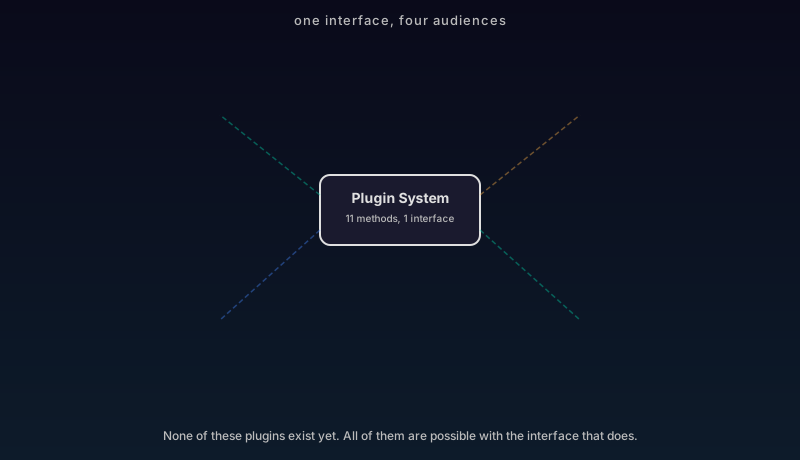
None of the plugins below exist today. They are not a product roadmap. Shurli’s core focus is the P2P networking platform: the transport, the identity, the relay circuits, the plugin framework itself. What gets built on top of it is up to the people, organizations, and AI agents that use it. These are illustrations of what the architecture makes possible for four very different audiences.
AI agents
An AI agent managing your home network does not need to understand Shurli’s internals. It needs a plugin interface it can talk to.
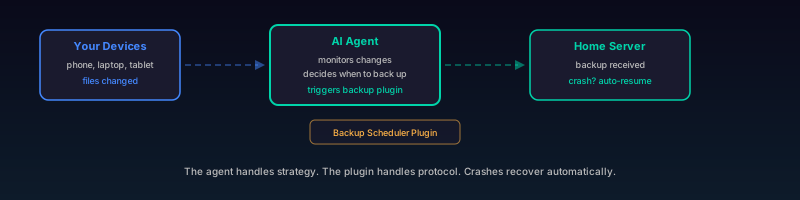
Backup scheduler. An agent monitors which files changed on your devices, decides when to back up, and triggers transfers to your home server. The plugin handles the P2P protocol. The agent handles the strategy. If the backup plugin crashes mid-transfer, the supervisor restarts it and the queued backups resume. The agent never notices.
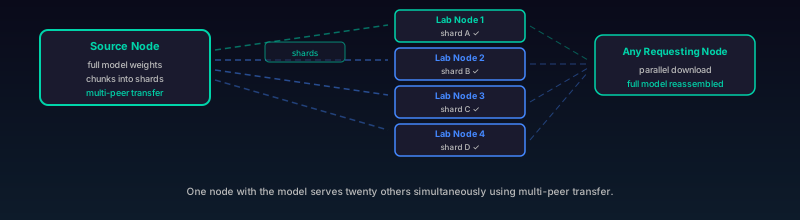
Model distribution. A research team shares large language model weights across their lab nodes. The plugin chunks the model, distributes shards across peers for parallel download, and verifies integrity. One node with the full model serves it to twenty others simultaneously using multi-peer transfer.
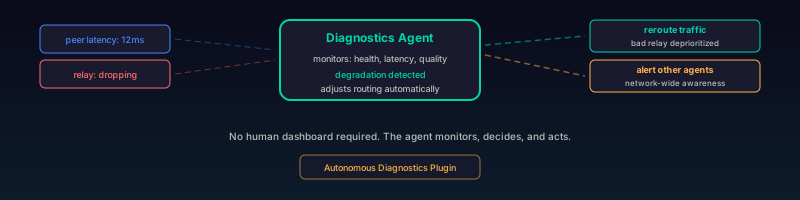
Autonomous diagnostics. An agent plugin that monitors node health, peer latency, connection quality, and relay performance. When it detects degradation, it adjusts routing preferences or alerts other agents on the network. No human dashboard required.
Enterprise
These are examples of what the plugin interface enables, not commitments on our roadmap. Enterprises need auditability, compliance, and fleet control. Plugins provide all three without modifying the core.
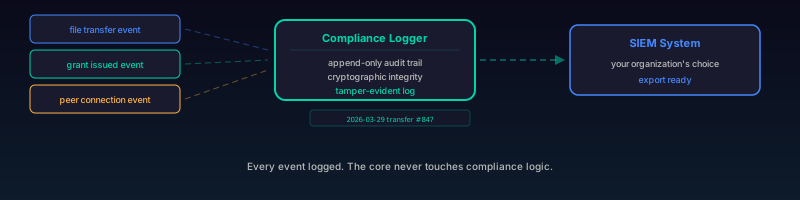
Compliance logger. Every file transfer, every grant issued, every peer connection is logged to an append-only audit trail with cryptographic integrity. The plugin hooks into the event framework, writes to a tamper-evident log, and exports to whatever SIEM (Security Information and Event Management) system the organization uses. The core never touches compliance logic.
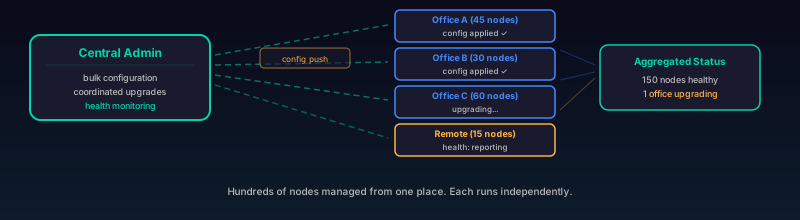
Fleet management. A central admin node manages hundreds of Shurli nodes across offices. The plugin provides bulk configuration, remote enable/disable of other plugins, coordinated upgrades, and health monitoring. Each remote node runs its own plugins independently, but the fleet plugin aggregates status.
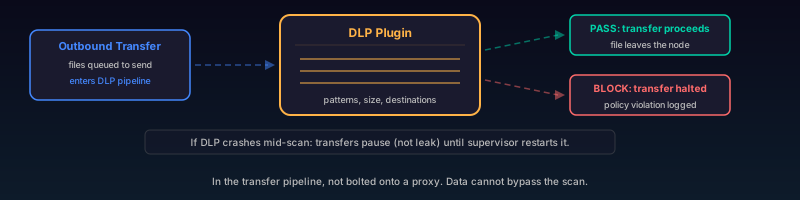
Data loss prevention. A plugin that inspects outbound transfers against policy rules before they leave the node. Sensitive file patterns, size thresholds, unapproved destinations. The plugin sits in the transfer pipeline, not bolted onto a proxy. If it crashes, transfers pause (not leak) until the supervisor restarts it.
Open source developers
Again, these are possibilities enabled by the platform, not features we are building ourselves. The plugin interface is documented, the SDK (Software Development Kit) is public, and Layer 2 will accept any language that compiles to WASM.
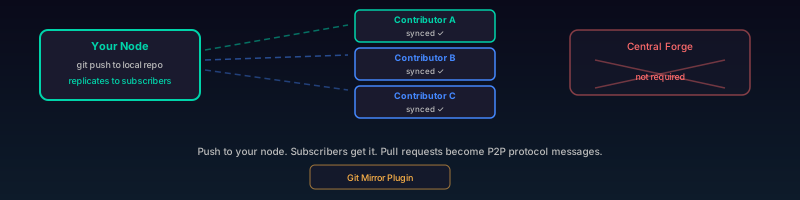
Git mirror. Decentralized git repository distribution. Push to your node, and the plugin replicates to every peer that has subscribed. No central forge required. Pull requests become P2P protocol messages. Code review happens between nodes.
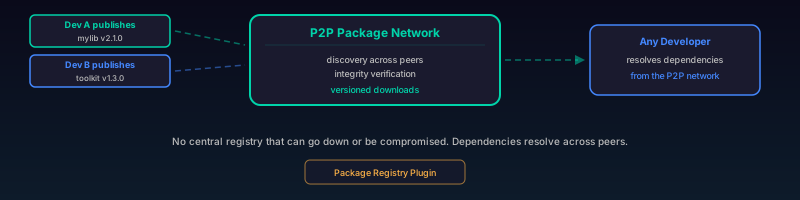
Package registry. A community-run package distribution network. Developers publish packages to their nodes. The plugin handles discovery, integrity verification, and versioned downloads. Dependencies resolve across the P2P network instead of through a central registry that can go down or be compromised.
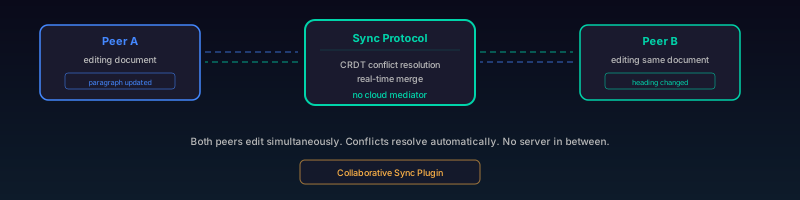
Collaborative sync. Real-time document sync between peers. Conflict resolution via CRDTs (conflict-free replicated data types). The plugin handles the sync protocol. The application handles the UI. No cloud server mediating edits.
Self-hosters
If you run your own infrastructure, plugins turn Shurli into the connective tissue between everything on your network.
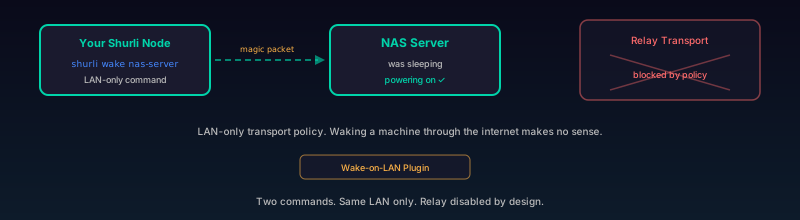
Wake-on-LAN. Power on machines remotely through Shurli. LAN-only transport policy (relay disabled, because waking a machine through the internet makes no sense). Two commands: shurli wake <machine> and shurli wake list.
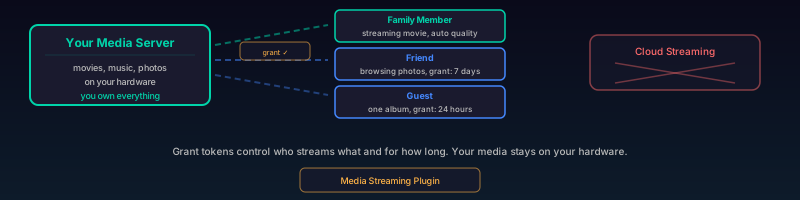
Media streaming. Serve your media library to authorized peers. The plugin handles transcoding negotiation, bandwidth-aware quality selection, and seek. Grant tokens control who can stream what and for how long. Your media stays on your hardware.
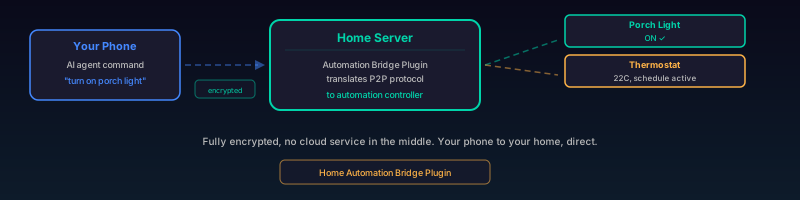
Home automation bridge. Connect Shurli to your home automation system. The plugin translates between Shurli’s P2P protocol and your automation controller’s API. An AI agent on your phone triggers actions on your home server through Shurli, fully encrypted, no cloud service in the middle.
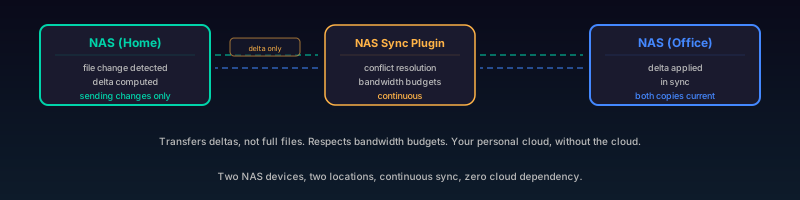
NAS sync. Continuous sync between network-attached storage devices across locations. The plugin detects file changes, transfers deltas (not full files), handles conflict resolution, and respects bandwidth budgets. Your personal cloud, without the cloud.
The file transfer plugin proves the pattern. Everything listed above uses the same eleven methods, the same supervisor, the same transport policies, the same credential isolation.
What comes next
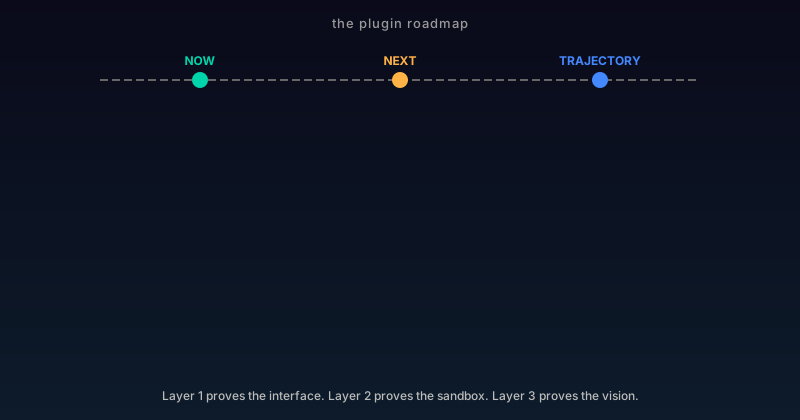
Layer 1 is shipped. The plugin interface is stable. The supervisor is battle-tested. The file transfer plugin proves the framework works under real conditions.
Layer 2 (WASM) is next. Third-party developers will be able to write plugins in any language that compiles to WebAssembly. The wazero runtime provides memory isolation, fuel metering (CPU limits), and capability-based resource access. The same PluginContext methods become host function calls. No API changes for the plugin author.
Layer 3 is the trajectory. AI agents reading skill descriptions and generating WASM plugins that extend the network autonomously. Safe because of Layer 2’s sandbox. Practical because of Layer 1’s battle-tested interface.
The goal has not changed: a Zero-Human Network where zero humans are required to operate it. Plugins are how the network grows new capabilities without human intervention. Layer 1 proves the interface. Layer 2 proves the sandbox. Layer 3 proves the vision.
Built with Claude Code by Anthropic - intent-based development where the direction is the hard part, and the code follows. Read more about the philosophy.