Daemon API
The Shurli daemon (shurli daemon) runs a long-lived P2P host with a Unix domain socket HTTP API for programmatic control.
Table of Contents
- Architecture
- Authentication
- Response Format
- Endpoints
- Error Codes
- CLI Usage
- Integration Examples
- Socket Lifecycle
Architecture
The daemon runs the full P2P lifecycle (relay connection, DHT bootstrap, service exposure, watchdog) plus an HTTP server on a Unix socket.
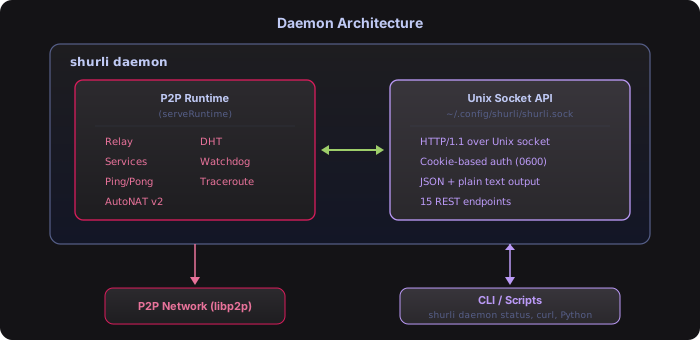
Default paths:
- Socket:
~/.shurli/shurli.sock(permissions0600) - Cookie:
~/.shurli/.daemon-cookie(permissions0600)
Authentication
The daemon uses cookie-based authentication (same pattern as Bitcoin Core, Docker, containerd).
How It Works
- On startup, the daemon generates a 32-byte random hex token
- Token is written to
~/.shurli/.daemon-cookiewith0600permissions - Every API request must include
Authorization: Bearer <token>header - Token is validated on every request -
401 Unauthorizedif missing or wrong - Cookie file is deleted on clean shutdown
- Token rotates on every daemon restart (limits exposure window)
Why Cookie Over Config-Based Password
- No plaintext passwords in config files
- Token rotates every daemon restart
- Same-user access only (cookie file is
0600) - Proven pattern used by Bitcoin Core, Docker, containerd
Example
curl -H "Authorization: Bearer $(cat ~/.shurli/.daemon-cookie)" \
     --unix-socket ~/.shurli/shurli.sock \
     http://localhost/v1/status
The CLI client (shurli daemon status, etc.) reads the cookie file automatically - no manual auth needed.
Tip: All curl examples in this document use inline
$(cat ~/.shurli/.daemon-cookie)so they work as-is when copy-pasted. For scripts that make multiple API calls, read the token once into a variable - see Integration Examples.
Unauthorized Response
{
  "error": "unauthorized: invalid or missing auth token"
}
HTTP status: 401 Unauthorized
Response Format
Every endpoint supports two output formats:
JSON (Default)
Success responses are wrapped in a data envelope:
{"data": { ... }}Error responses use an error envelope:
{"error": "description of what went wrong"}Plain Text
Request plain text via:
- Query parameter:
?format=text - Accept header:
Accept: text/plain
Plain text responses are single-line or tabular, designed for grep/awk/cut.
CLI Format Selection
shurli daemon status          # human-readable text
shurli daemon status --json   # raw JSON
Endpoints
GET /v1/status
Returns daemon status: peer ID, version, uptime, connected peers, addresses, services count, network capabilities, and reachability grade.
Response (JSON):
{
  "data": {
    "peer_id": "12D3KooWPrmh163sTHW3mYQm7YsLsSR2wr71fPp4g6yjuGv3sGQt",
    "version": "0.1.0",
    "uptime_seconds": 3600,
    "connected_peers": 2,
    "listen_addresses": [
      "/ip4/10.0.1.50/tcp/9000",
      "/ip4/10.0.1.50/udp/9000/quic-v1"
    ],
    "relay_addresses": [
      "/ip4/203.0.113.50/tcp/7777/p2p/12D3KooWK.../p2p-circuit"
    ],
    "services_count": 2,
    "has_global_ipv6": true,
    "has_global_ipv4": false,
    "nat_type": "port-restricted",
    "stun_external_addrs": ["203.0.113.50:12345"],
    "is_relaying": false,
    "reachability": {
      "grade": "A",
      "label": "Excellent",
      "description": "Public IPv6 detected"
    }
  }
}
Response (Text):
peer_id: 12D3KooWPrmh163sTHW3mYQm7YsLsSR2wr71fPp4g6yjuGv3sGQt
version: 0.1.0
uptime: 3600s
connected_peers: 2
services: 2
listen_addresses: 2
  /ip4/10.0.1.50/tcp/9000
  /ip4/10.0.1.50/udp/9000/quic-v1
relay_addresses: 1
/ip4/203.0.113.50/tcp/7777/p2p/12D3KooWK.../p2p-circuitcurl:
curl -H "Authorization: Bearer $(cat ~/.shurli/.daemon-cookie)" \
     --unix-socket ~/.shurli/shurli.sock \
     http://localhost/v1/status
GET /v1/services
Lists all registered services.
Response (JSON):
{
  "data": [
    {
      "name": "ssh",
      "protocol": "/shurli/ssh/1.0.0",
      "local_address": "localhost:22",
      "enabled": true
    },
    {
      "name": "ollama",
      "protocol": "/shurli/ollama/1.0.0",
      "local_address": "localhost:11434",
      "enabled": true
    }
  ]
}
Response (Text) (tab-separated):
ssh	localhost:22	/shurli/ssh/1.0.0	enabled
ollama	localhost:11434	/shurli/ollama/1.0.0	enabled
GET /v1/peers
Lists connected peers with their addresses and software version.
By default, only shurli and relay-server peers are shown. Shurli uses a private Kademlia DHT (/shurli/kad/1.0.0), isolated from the public IPFS Amino network. Your node only communicates with other Shurli nodes for DHT peer discovery.
To see all connected peers (including DHT neighbors), add ?all=true:
GET /v1/peers           → only shurli/relay-server peers
GET /v1/peers?all=true → all connected peers (including DHT neighbors)CLI:
shurli daemon peers          # only shurli peers
shurli daemon peers --all    # all peers including DHT neighbors
Response (JSON):
{
  "data": [
    {
      "id": "12D3KooWNq8c1fNjXwhRoWxSXT419bumWQFoTbowCwHEa96RJRg6",
      "addresses": [
        "/ip4/203.0.113.50/tcp/7777/p2p/12D3KooWK.../p2p-circuit/p2p/12D3KooWH..."
      ],
      "agent_version": "shurli/0.1.0"
    }
  ]
}
Response (Text):
12D3KooWNq8c1fN... shurli/0.1.0 3 addrsGET /v1/auth
Lists authorized peers from the authorized_keys file. Includes verification status and expiry if set.
Response (JSON):
{
  "data": [
    {
      "peer_id": "12D3KooWNq8c1fNjXwhRoWxSXT419bumWQFoTbowCwHEa96RJRg6",
      "comment": "laptop",
      "verified": "sha256:a1b2c3d4",
      "expires_at": ""
    },
    {
      "peer_id": "12D3KooWPrmh163sTHW3mYQm7YsLsSR2wr71fPp4g6yjuGv3sGQt",
      "comment": "contractor-bob",
      "verified": "",
      "expires_at": "2026-03-15T00:00:00Z"
    }
  ]
}| Field | Type | Description |
|---|---|---|
peer_id | string | The peer’s libp2p ID |
comment | string | Human-readable label (from # comment in authorized_keys) |
verified | string | SAS verification fingerprint prefix, empty if unverified |
expires_at | string | RFC3339 expiry timestamp, empty if never expires |
Response (Text):
12D3KooWNq8c1fNjXwhRoWxSXT419bumWQFoTbowCwHEa96RJRg6 # laptopGET /v1/paths
Lists active connection paths to all connected peers, including path type, transport, IP version, and latency.
Response (JSON):
{
  "data": [
    {
      "peer_id": "12D3KooWPrmh163sTHW3mYQm7YsLsSR2wr71fPp4g6yjuGv3sGQt",
      "path_type": "DIRECT",
      "address": "/ip6/2001:db8::1/udp/9000/quic-v1",
      "connected_at": "2026-02-23T10:30:00Z",
      "transport": "quic",
      "ip_version": "IPv6",
      "last_rtt_ms": 6.1
    }
  ]
}| Field | Type | Description |
|---|---|---|
peer_id | string | The connected peer’s ID |
path_type | string | DIRECT or RELAYED |
address | string | Multiaddr of the connection |
connected_at | string | RFC3339 timestamp of connection |
transport | string | quic or tcp |
ip_version | string | IPv4 or IPv6 |
last_rtt_ms | float | Last measured RTT in milliseconds (0 if unknown) |
Response (Text):
12D3KooWPrmh16... DIRECT quic IPv6 rtt=6.1msPOST /v1/auth
Adds a peer to authorized_keys and hot-reloads the connection gater. Takes effect immediately - no restart needed.
Request Body:
{
  "peer_id": "12D3KooWNq8c1fNjXwhRoWxSXT419bumWQFoTbowCwHEa96RJRg6",
  "comment": "laptop"
}
Response (JSON):
{
  "data": {
    "status": "added"
  }
}
DELETE /v1/auth/{peer_id}
Removes a peer from authorized_keys and hot-reloads the connection gater. Access revoked immediately.
Response (JSON):
{
  "data": {
    "status": "removed"
  }
}curl:
curl -X DELETE \
     -H "Authorization: Bearer $(cat ~/.shurli/.daemon-cookie)" \
     --unix-socket ~/.shurli/shurli.sock \
     http://localhost/v1/auth/12D3KooWNq8c1fNjXwhRoWxSXT419bumWQFoTbowCwHEa96RJRg6
POST /v1/ping
Pings a peer using the P2P ping-pong protocol. Returns per-ping results and summary statistics.
Request Body:
{
  "peer": "home-server",
  "count": 4,
  "interval_ms": 1000
}| Field | Type | Default | Description |
|---|---|---|---|
peer | string | required | Peer name or ID |
count | int | 4 | Number of pings (API defaults to 4) |
interval_ms | int | 1000 | Milliseconds between pings |
Response (JSON):
{
  "data": {
    "results": [
      {"seq": 1, "peer_id": "12D3KooWPrmh...", "rtt_ms": 45.2, "path": "RELAYED"},
      {"seq": 2, "peer_id": "12D3KooWPrmh...", "rtt_ms": 42.1, "path": "DIRECT"},
      {"seq": 3, "peer_id": "12D3KooWPrmh...", "rtt_ms": 43.0, "path": "DIRECT"},
      {"seq": 4, "peer_id": "12D3KooWPrmh...", "rtt_ms": 41.8, "path": "DIRECT"}
    ],
    "stats": {
      "sent": 4,
      "received": 4,
      "lost": 0,
      "loss_pct": 0.0,
      "min_ms": 41.8,
      "avg_ms": 43.0,
      "max_ms": 45.2
    }
  }
}
Response (Text):
PING home-server (12D3KooWPrmh163s...):
seq=1 rtt=45.2ms path=[RELAYED]
seq=2 rtt=42.1ms path=[DIRECT]
seq=3 rtt=43.0ms path=[DIRECT]
seq=4 rtt=41.8ms path=[DIRECT]
--- home-server ping statistics ---
4 sent, 4 received, 0% loss, rtt min/avg/max = 41.8/43.0/45.2 ms
POST /v1/traceroute
Traces the network path to a peer. Shows whether the connection is direct or relayed, with per-hop latency.
Request Body:
{
  "peer": "home-server"
}
Response (JSON):
{
  "data": {
    "target": "home-server",
    "target_peer_id": "12D3KooWPrmh...",
    "path": "RELAYED via relay-server/0.1.0",
    "hops": [
      {
        "hop": 1,
        "peer_id": "12D3KooWK...",
        "name": "relay",
        "address": "203.0.113.50:7777",
        "rtt_ms": 23.0
      },
      {
        "hop": 2,
        "peer_id": "12D3KooWPrmh...",
        "name": "home-server",
        "address": "via relay",
        "rtt_ms": 45.0
      }
    ]
  }
}
Response (Text):
traceroute to home-server (12D3KooWPrmh163s...):
 1  12D3KooWK...  (relay)  203.0.113.50:7777  23.0ms
 2  12D3KooWPrmh...  (home-server)  via relay  45.0ms
--- path: [RELAYED via relay-server/0.1.0] ---
POST /v1/resolve
Resolves a peer name to its peer ID. Shows the resolution source.
Request Body:
{
  "name": "home-server"
}
Response (JSON):
{
  "data": {
    "name": "home-server",
    "peer_id": "12D3KooWPrmh163sTHW3mYQm7YsLsSR2wr71fPp4g6yjuGv3sGQt",
    "source": "local_config"
  }
}| Source | Meaning |
|---|---|
local_config | Resolved from names: section in config |
peer_id | Input was already a valid peer ID |
Response (Text):
home-server → 12D3KooWPrmh163sTHW3mYQm7YsLsSR2wr71fPp4g6yjuGv3sGQt (source: local_config)POST /v1/connect
Creates a dynamic TCP proxy to a peer’s service. Returns a proxy ID and the local listen address.
Request Body:
{
  "peer": "home-server",
  "service": "ssh",
  "listen": "127.0.0.1:2222"
}| Field | Type | Description |
|---|---|---|
peer | string | Peer name or ID |
service | string | Service name to connect to |
listen | string | Local address:port to listen on |
Response (JSON):
{
  "data": {
    "id": "proxy-1",
    "listen_address": "127.0.0.1:2222",
    "path_type": "DIRECT",
    "address": "/ip4/10.0.1.50/tcp/9100"
  }
}| Field | Type | Description |
|---|---|---|
id | string | Proxy ID (use for disconnect) |
listen_address | string | Local TCP address the proxy listens on |
path_type | string | Connection path: DIRECT or RELAYED (omitted if unknown) |
address | string | Remote peer’s multiaddr (omitted if unknown) |
After this call, ssh [email protected] -p 2222 connects to the remote peer’s SSH service through the P2P tunnel.
DELETE /v1/connect/{id}
Tears down an active proxy by ID.
Response (JSON):
{
  "data": {
    "status": "disconnected"
  }
}curl:
curl -X DELETE \
     -H "Authorization: Bearer $(cat ~/.shurli/.daemon-cookie)" \
     --unix-socket ~/.shurli/shurli.sock \
     http://localhost/v1/connect/proxy-1
POST /v1/expose
Dynamically registers a service on the P2P host. Other peers can connect to it immediately.
Request Body:
{
  "name": "jupyter",
  "local_address": "localhost:8888"
}
Response (JSON):
{
  "data": {
    "status": "exposed"
  }
}
DELETE /v1/expose/{name}
Unregisters a service from the P2P host.
Response (JSON):
{
  "data": {
    "status": "unexposed"
  }
}
POST /v1/shutdown
Requests a graceful shutdown of the daemon. The daemon closes all active proxies, shuts down the HTTP server, removes the socket and cookie files, then exits.
Response (JSON):
{
  "data": {
    "status": "shutting down"
  }
}
Error Codes
| HTTP Status | Meaning |
|---|---|
200 | Success |
400 | Bad request (missing/invalid fields) |
401 | Unauthorized (missing/wrong auth token) |
404 | Not found (unknown proxy ID, unresolvable name) |
500 | Internal error (file I/O failure, network error) |
All error responses use the envelope:
{
  "error": "description of what went wrong"
}
Sentinel Errors
| Error | Trigger |
|---|---|
daemon already running | Socket is in use by another daemon instance |
daemon not running | Socket file doesn’t exist (client can’t connect) |
proxy not found | Disconnect called with unknown proxy ID |
unauthorized | Missing or invalid auth token |
CLI Usage
The CLI communicates with the daemon over the Unix socket. It reads the cookie file automatically.
Starting the Daemon
shurli daemon              # Start daemon (foreground)
shurli daemon start        # Same as above
Querying the Daemon
shurli daemon status               # Human-readable status
shurli daemon status --json        # JSON output
shurli daemon services             # List services
shurli daemon services --json
shurli daemon peers                # List connected peers
shurli daemon peers --json
Network Diagnostics (via daemon)
shurli daemon ping home-server                 # 4 pings via daemon
shurli daemon ping home-server -c 10           # 10 pings
shurli daemon ping home-server --json          # JSON output
Dynamic Proxy Management
# Create a proxy
shurli daemon connect --peer home-server --service ssh --listen 127.0.0.1:2222

# Use it
ssh [email protected] -p 2222

# Tear it down
shurli daemon disconnect proxy-1
Stopping the Daemon
shurli daemon stop # Graceful shutdown via APIIntegration Examples
Bash Script
#!/bin/bash
SOCKET=~/.shurli/shurli.sock
TOKEN=$(cat ~/.shurli/.daemon-cookie)

# Check if daemon is running
if [ ! -S "$SOCKET" ]; then
    echo "Daemon not running"
    exit 1
fi

# Get peer count
PEERS=$(curl -s -H "Authorization: Bearer $TOKEN" \
    --unix-socket "$SOCKET" \
    http://localhost/v1/status | jq '.data.connected_peers')

echo "Connected peers: $PEERS"

# Create SSH proxy to home server
PROXY=$(curl -s -X POST -H "Authorization: Bearer $TOKEN" \
    -d '{"peer":"home-server","service":"ssh","listen":"127.0.0.1:2222"}' \
    --unix-socket "$SOCKET" \
    http://localhost/v1/connect)

echo "Proxy: $(echo $PROXY | jq -r '.data.id')"
echo "Listen: $(echo $PROXY | jq -r '.data.listen_address')"
Python (direct socket)
import http.client
import json
import socket

SOCKET_PATH = os.path.expanduser("~/.shurli/shurli.sock")
COOKIE_PATH = os.path.expanduser("~/.shurli/.daemon-cookie")

# Read auth token
with open(COOKIE_PATH) as f:
    token = f.read().strip()

# Connect over Unix socket
conn = http.client.HTTPConnection("localhost")
conn.sock = socket.socket(socket.AF_UNIX, socket.SOCK_STREAM)
conn.sock.connect(SOCKET_PATH)

# Query status
conn.request("GET", "/v1/status", headers={
    "Authorization": f"Bearer {token}"
})
resp = conn.getresponse()
data = json.loads(resp.read())
print(f"Peer ID: {data['data']['peer_id']}")
print(f"Peers: {data['data']['connected_peers']}")
Socket Lifecycle
Startup
- Generate 32-byte random hex token
- Write token to
~/.shurli/.daemon-cookie(0600) - Check for stale socket - dial the existing socket:
- Connection succeeds → another daemon is alive → return
ErrDaemonAlreadyRunning - Connection fails → stale socket → remove it and proceed
- Connection succeeds → another daemon is alive → return
- Create Unix socket at
~/.shurli/shurli.sock - Set socket permissions to
0600 - Start HTTP server on the socket
Stale Socket Detection
No PID files. The daemon dials the existing socket to determine if a daemon is alive:
- If the dial succeeds, another daemon is running - refuse to start.
- If the dial fails, the socket is stale (leftover from a crash) - remove it and start fresh.
This is more reliable than PID files, which can be stale themselves.
Shutdown
- HTTP server shutdown with 3s grace period
- All active proxies cancelled and awaited
- Socket file removed
- Cookie file removed
Last Updated: 2026-02-23