Monitoring
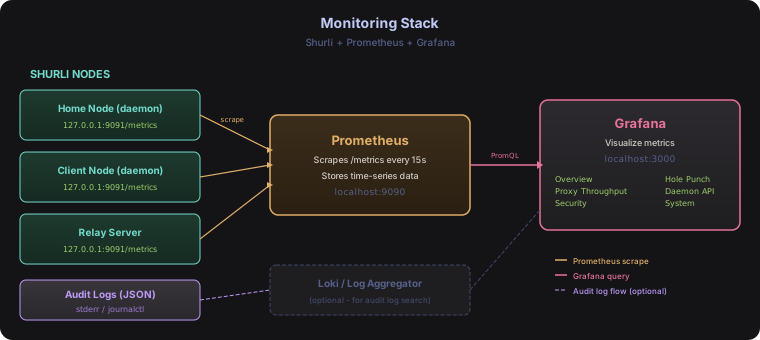
This guide walks you through setting up Prometheus and Grafana to visualize Shurli metrics. By the end, you’ll have a live dashboard showing proxy throughput, auth decisions, hole punch stats, API latency, and system health.
Prerequisites
- Shurli running with telemetry enabled
- Docker (recommended) or local Prometheus + Grafana installs
Step 1: Enable telemetry in Shurli
Add this to your shurli.yaml (or relay config):
telemetry:
  metrics:
    enabled: true
    listen_address: "127.0.0.1:9091"
  audit:
    enabled: true
Restart the daemon. Verify metrics are being served:
curl http://127.0.0.1:9091/metricsYou should see output starting with # HELP and # TYPE lines, followed by metric values. Both custom shurli_* metrics and libp2p built-in metrics (libp2p_*) will appear.
Relay server: When both
health.enabledandtelemetry.metrics.enabledare set, the relay adds/metricsto its existing/healthzHTTP mux. No extra port needed.
Step 2: Set up Prometheus
Option A: Docker (recommended)
Create a prometheus.yml config file:
global:
  scrape_interval: 15s

scrape_configs:
  - job_name: 'shurli'
    static_configs:
      - targets: ['host.docker.internal:9091']
        labels:
          instance: 'home-node'
Replace
host.docker.internalwith the actual IP if not running on the same machine. Use172.17.0.1on Linux.
Run Prometheus:
docker run -d \
  --name prometheus \
  -p 9090:9090 \
  -v $(pwd)/prometheus.yml:/etc/prometheus/prometheus.yml \
  prom/prometheus
Verify at http://localhost:9090/targets - the shurli target should show as UP.
Option B: Local install
Download from prometheus.io/download, add the same prometheus.yml config, and run ./prometheus --config.file=prometheus.yml.
Scraping multiple nodes
Add each Shurli instance as a separate target:
scrape_configs:
  - job_name: 'shurli'
    static_configs:
      - targets: ['10.0.1.50:9091']
        labels:
          instance: 'home-node'
      - targets: ['10.0.1.51:9091']
        labels:
          instance: 'client-node'
  - job_name: 'shurli-relay'
    static_configs:
      - targets: ['relay.example.com:9091']
        labels:
          instance: 'relay'
Step 3: Set up Grafana
Docker
docker run -d \
  --name grafana \
  -p 3000:3000 \
  grafana/grafana
Open http://localhost:3000 (default login: admin / admin).
Add Prometheus as a data source
- Go to Connections > Data sources > Add data source
- Select Prometheus
- Set URL to
http://host.docker.internal:9090(orhttp://172.17.0.1:9090on Linux) - Click Save & test
Step 4: Import the Shurli dashboard
- Go to Dashboards > Import
- Click Upload dashboard JSON file
- Select
grafana/shurli-dashboard.jsonfrom the Shurli repository - Select your Prometheus data source when prompted
- Click Import
You’ll immediately see the dashboard with 56 panels (45 visualizations + 11 row headers) across 11 sections.
Dashboard sections

Overview
Six stat panels showing the essentials at a glance:
- Version - which Shurli version is running
- Uptime - how long the daemon has been running
- Active Proxy Connections - current session count
- Total Connections - lifetime connection count
- Total Bytes Transferred - all proxy traffic
- Auth Allow / Deny - cumulative auth decisions
Proxy Throughput
Track how your services are performing:
- Throughput (bytes/sec) - ingress and egress per service (ssh, xrdp, ollama, etc.)
- Active Connections - live gauge per service
- Connection Rate - new connections per second
- Connection Duration - p50, p95, p99 percentiles per service
Security
Monitor access control:
- Auth Decisions Rate - allow/deny per second (deny spikes = something probing your node)
- Auth Decisions (Cumulative) - total allow vs deny count
Hole Punch (NAT Traversal)
Understand your NAT traversal success:
- Hole Punch Attempts - success vs failure count over time
- Success Rate - gauge showing what percentage of hole punches succeed (green > 70%, orange > 50%, red < 50%)
- Hole Punch Duration - p50 and p95 timing (tells you how long direct connection setup takes)
Daemon API
API health and latency:
- Request Rate - requests per second by endpoint path
- Request Latency - p50 and p95 response times by path
- Requests by Status Code - 200/404/500 breakdown (4xx in orange, 5xx in red)
System
Go runtime health:
- Memory Usage - heap in-use, system allocated, RSS
- Goroutines - should be stable (a leak shows as continuous growth)
- GC Rate - garbage collection cycles per second
- Open File Descriptors - current vs max (hitting max = connection failures)
- CPU Usage - process CPU utilization
Available metrics reference
Custom shurli metrics
| Metric | Type | Labels | Description |
|---|---|---|---|
shurli_proxy_bytes_total | Counter | direction, service | Bytes transferred through proxy |
shurli_proxy_connections_total | Counter | service | Connections established |
shurli_proxy_active_connections | Gauge | service | Currently active connections |
shurli_proxy_duration_seconds | Histogram | service | Connection session duration |
shurli_auth_decisions_total | Counter | decision | Auth allow/deny counts |
shurli_holepunch_total | Counter | result | Hole punch success/failure |
shurli_holepunch_duration_seconds | Histogram | result | Hole punch attempt duration |
shurli_daemon_requests_total | Counter | method, path, status | API request counts |
shurli_daemon_request_duration_seconds | Histogram | method, path, status | API request latency |
shurli_vault_sealed | Gauge | - | Vault seal state (1=sealed, 0=unsealed) |
shurli_vault_seal_operations_total | Counter | trigger | Seal/unseal transitions by trigger |
shurli_vault_unseal_total | Counter | result | Remote unseal attempts (success/failure/denied/blocked/locked_out/error) |
shurli_vault_unseal_locked_peers | Gauge | - | Peers currently in lockout or permanently blocked |
shurli_deposit_operations_total | Counter | operation | Invite deposit lifecycle (create/revoke/modify) |
shurli_deposit_pending | Gauge | - | Pending unconsumed invite deposits |
shurli_pairing_total | Counter | result | Relay-mediated pairing attempts |
shurli_macaroon_verify_total | Counter | result | Macaroon token verifications |
shurli_admin_request_total | Counter | endpoint, status | Admin socket request counts |
shurli_admin_request_duration_seconds | Histogram | endpoint | Admin socket request latency |
shurli_info | Gauge | version, go_version | Build information |
libp2p built-in metrics (free, no extra code)
When metrics are enabled, all libp2p instrumentation appears automatically:
libp2p_swarm_connections_*- connections by transport and directionlibp2p_holepunch_*- hole punch protocol eventslibp2p_autorelay_*- relay reservation statuslibp2p_autonat_*- NAT reachability detectionlibp2p_autonatv2_*- per-address reachability (v2)libp2p_identify_*- peer identification eventslibp2p_rcmgr_*- resource manager limits and usagelibp2p_relaysvc_*- relay service stats (relay server only)
Go runtime metrics
Standard Go collectors are registered automatically:
go_goroutines- current goroutine countgo_memstats_alloc_bytes- heap allocationgo_gc_duration_seconds- GC pause timesprocess_cpu_seconds_total- CPU usageprocess_open_fds/process_max_fds- file descriptorsprocess_resident_memory_bytes- RSS
Audit logging
When telemetry.audit.enabled is set, security events are logged as structured JSON to stderr:
{"time":"2026-02-21T10:30:00Z","level":"WARN","msg":"auth_decision","audit":{"peer":"12D3KooW...","direction":"inbound","result":"deny"}}
{"time":"2026-02-21T10:30:01Z","level":"INFO","msg":"daemon_api_access","audit":{"method":"GET","path":"/v1/status","status":200}}
Event types
| Event | Level | Fields | When |
|---|---|---|---|
auth_decision | INFO/WARN | peer, direction, result | Every inbound connection (WARN for deny) |
service_acl_deny | WARN | peer, service | Peer authorized but blocked by per-service ACL |
daemon_api_access | INFO | method, path, status | Every daemon API request |
auth_change | INFO | action, peer | Peer added or removed via API |
Sending audit logs to a log aggregator
Since audit events go to stderr, you can pipe them to any log collector:
systemd journal (default when running as a service):
journalctl -u shurli-daemon -o json | jq 'select(.MESSAGE | contains("audit"))'File output:
shurli daemon 2> /var/log/shurli-audit.jsonLoki / Promtail: Point Promtail at the journal or log file, filter on audit field presence.
Docker Compose (all-in-one)
For a quick local stack with Prometheus + Grafana + Shurli metrics:
services:
  prometheus:
    image: prom/prometheus
    ports:
      - "9090:9090"
    volumes:
      - ./prometheus.yml:/etc/prometheus/prometheus.yml
    extra_hosts:
      - "host.docker.internal:host-gateway"

  grafana:
    image: grafana/grafana
    ports:
      - "3000:3000"
    environment:
      - GF_SECURITY_ADMIN_PASSWORD=admin
    volumes:
      - grafana-data:/var/lib/grafana

volumes:
  grafana-data:
Start with docker compose up -d, then import the dashboard at http://localhost:3000.
Useful PromQL queries
Proxy throughput over last hour:
sum(rate(shurli_proxy_bytes_total[1h])) by (service, direction)Hole punch success rate (last 24h):
sum(shurli_holepunch_total{result="success"}) / sum(shurli_holepunch_total)Top API endpoints by latency (p95):
histogram_quantile(0.95, sum by (le, path) (rate(shurli_daemon_request_duration_seconds_bucket[5m])))Auth deny rate (should be near zero for a healthy node):
rate(shurli_auth_decisions_total{decision="deny"}[5m])Memory trend:
process_resident_memory_bytesAlerting examples
If you use Grafana alerting or Alertmanager, here are useful alert rules:
# Too many auth denials (possible scanning/attack)
- alert: HighAuthDenyRate
  expr: rate(shurli_auth_decisions_total{decision="deny"}[5m]) > 1
  for: 5m
  labels:
    severity: warning
  annotations:
    summary: "High auth denial rate on {{ $labels.instance }}"

# Hole punch success rate dropping
- alert: LowHolePunchSuccess
  expr: sum(shurli_holepunch_total{result="success"}) / sum(shurli_holepunch_total) < 0.5
  for: 15m
  labels:
    severity: warning
  annotations:
    summary: "Hole punch success rate below 50% on {{ $labels.instance }}"

# File descriptor exhaustion approaching
- alert: FileDescriptorHigh
  expr: process_open_fds / process_max_fds > 0.8
  for: 5m
  labels:
    severity: critical
  annotations:
    summary: "File descriptors at {{ $value | humanizePercentage }} on {{ $labels.instance }}"